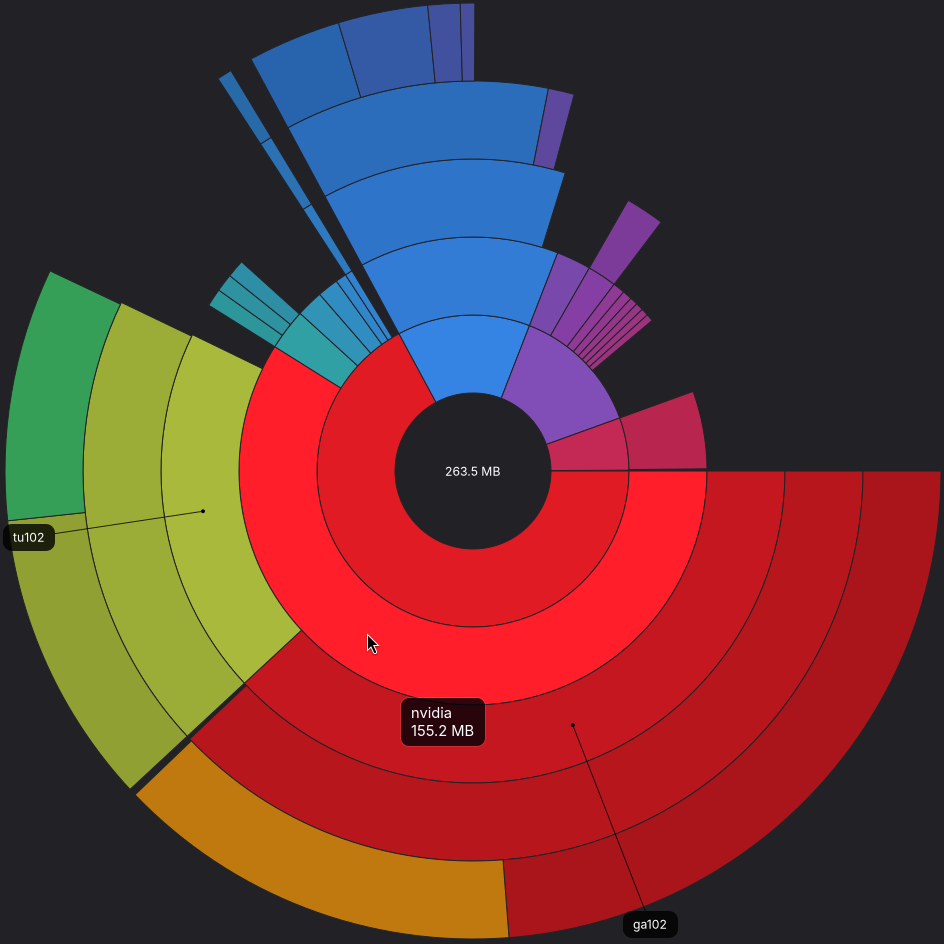
Right, you are in a situation where you cannot build the initramfs (to make it smaller) because you have so little space left that you cannot build the smaller initramfs.
You could try the (dangerous if your power fails in the middle) following:
With the external power supply plugged in:
sudo rm /boot/initrd.img-7.0.3-mnt-reform-arm64 sudo update-initramfs -u
jsae@reform:~$ sudo update-initramfs -u
update-initramfs: Generating /boot/initrd.img-6.19.14-mnt-reform-arm64
cryptsetup: WARNING: reform_crypt: ignoring unknown option 'luks.discard'
Using DTB: amlogic/meson-g12b-bananapi-cm4-mnt-reform2.dtb
Installing /usr/lib/linux-image-6.19.14-mnt-reform-arm64/amlogic/meson-g12b-bananapi-cm4-mnt-reform2.dtb into /boot/dtbs/6.19.14-mnt-reform-arm64/amlogic/meson-g12b-bananapi-cm4-mnt-reform2.dtb
Taking backup of meson-g12b-bananapi-cm4-mnt-reform2.dtb.
Installing new meson-g12b-bananapi-cm4-mnt-reform2.dtb.
Ignoring old or unknown version 6.19.14-mnt-reform-arm64 (latest is 7.0.3-mnt-reform-arm64)
sudo update-initramfs -u -k all
jsae@reform:~$ sudo update-initramfs -u -k all
update-initramfs: Generating /boot/initrd.img-6.19.14-mnt-reform-arm64
cryptsetup: WARNING: reform_crypt: ignoring unknown option 'luks.discard'
Using DTB: amlogic/meson-g12b-bananapi-cm4-mnt-reform2.dtb
Installing /usr/lib/linux-image-6.19.14-mnt-reform-arm64/amlogic/meson-g12b-bananapi-cm4-mnt-reform2.dtb into /boot/dtbs/6.19.14-mnt-reform-arm64/amlogic/meson-g12b-bananapi-cm4-mnt-reform2.dtb
Taking backup of meson-g12b-bananapi-cm4-mnt-reform2.dtb.
Installing new meson-g12b-bananapi-cm4-mnt-reform2.dtb.
Ignoring old or unknown version 6.19.14-mnt-reform-arm64 (latest is 7.0.3-mnt-reform-arm64)
Checked size - relieving results!
jsae@reform:~$ df -h /boot
Filesystem      Size  Used Avail Use% Mounted on
/dev/mmcblk0p1  464M  140M  291M  33% /boot
Time to heal the problems that installing the Nvidia firmware caused:
sudo apt update
sudo apt full-upgrade
EDIT: update results
jsae@reform:~$ sudo apt update
Hit:1 http://deb.debian.org/debian unstable InRelease
Hit:2 https://updates.signal.org/desktop/apt xenial InRelease
Hit:4 https://packages.mozilla.org/apt mozilla InRelease
Ign:5 https://mntre.com/reform-debian-repo reform InRelease
Hit:6 https://mntre.com/reform-debian-repo reform Release
Ign:7 https://mntre.com/reform-debian-repo reform Release.gpg
Ign:3 https://repo.waydro.id/waydroid waydroid InRelease
Err:8 https://repo.waydro.id/waydroid waydroid Release
  404  Not Found [IP: 142.132.224.101 443]
Error: The repository 'http://repo.waydro.id/waydroid waydroid Release' does not have a Release file.
Notice: Updating from such a repository can't be done securely, and is therefore disabled by default.
Notice: See apt-secure(8) manpage for repository creation and user configuration details.
Notice: Missing Signed-By in the sources.list(5) entry for 'https://mntre.com/reform-debian-repo'
Edit2: initial report for apt full-upgrade
jsae@reform:~$ sudo apt full-upgrade
The following packages were automatically installed and are no longer required:
  libgexiv2-2  libthrift-0.22.0  reform-qcacld2-7.0.3-mnt-reform-arm64
Use 'sudo apt autoremove' to remove them.

Upgrading:
  geoclue-2.0         libexpat1-dev           libparquet2300                  localsearch                   nautilus-data
  gir1.2-geoclue-2.0  libgeoclue-2-0          linux-base-mnt-reform-arm64     localsearch-extractor-ffmpeg  reform-qcacld2
  libarrow2300        libgtkmm-3.0-1t64       linux-headers-mnt-reform-arm64  localsearch-extractor-iso     vim
  libatkmm-1.6-1v5    libmd0                  linux-image-mnt-reform-arm64    localsearch-extractor-office  vim-common
  libexpat1           libnautilus-extension4  linux-libc-dev                  nautilus                      vim-runtime

Installing dependencies:
  libgexiv2-0.16-4                   linux-binary-7.0.4-mnt-reform-arm64   linux-image-7.0.4-mnt-reform-arm64    reform-qcacld2-7.0.4-mnt-reform-arm64
  libthrift-0.23.0                   linux-headers-7.0.4-common            linux-kbuild-7.0.4
  linux-base-7.0.4-mnt-reform-arm64  linux-headers-7.0.4-mnt-reform-arm64  linux-modules-7.0.4-mnt-reform-arm64

Suggested packages:
  debian-kernel-handbook  linux-doc-7.0

Summary:
  Upgrading: 25, Installing: 10, Removing: 0, Not Upgrading: 0
  5 not fully installed or removed.
  Download size: 113 MB
  Space needed: 286 MB / 843 GB available
  └─ in /boot:  106 MB / 304 MB available

Continue? [Y/n]
Rebooted for new kernel. “Final” results on cleanup. sudo reform-check
jsae@reform:~$ sudo reform-check
[sudo] password for jsae:
I: Contents of /proc/device-tree/model: MNT Reform 2 with BPI-CM4 Module
I: `uname -a` output: Linux reform 7.0.4-mnt-reform-arm64 #1 SMP PREEMPT Debian 7.0.4-1+reform20260507T091502Z (2026-05-07 aarch64 GNU/Linux
I: Version of linux-image-mnt-reform-arm64: 7.0.4-1+reform20260507T091502Z
I: Version of reform-tools: 1.86-1+reform20260505T063908Z+1
I: Version of system image: System Image v4: 2024-06-30
I: Version of LPC firmware: MREF2LPC 25_R2 20231124
I: Version of upstream U-Boot: 2024.04
I: Version of MNT U-Boot: 2026-01-28
I: probably booting via /boot/extlinux/extlinux.conf (/boot/boot.scr also exists)
I: Mount source of /: /dev/reformvg/root (LVM vg 'reformvg' on LUKS device 'reform_crypt' on SSD)
I: Mount source of /boot: /dev/mmcblk0p1 (SD-card)
I: Suggests of reform-desktop-minimal is not installed: firmware-atheros
I: Suggests of reform-desktop-minimal is not installed: firmware-iwlwifi
I: the following files differ from how they are shipped by reform-tools (ignore /var/lib/alsa/asound.state):
??5??????   /var/lib/alsa/asound.state
I: the reform-qcacld2 package is only required for wifi on the Pocket Reform with i.MX8MP, you can safely remove it unless you plan to go back to the imx8m+
W: eMMC does not contain latest bootloader
W: You can update it to the latest version by running as root:
reform-flash-bootloader emmc
I: note that updating the bootloader on eMMC on your platform is not without risk!
I: The space where the bootloader would've been on eMMC is all zeroes.
I: SD-card contains the latest bootloader version 2026-01-28
dpkg -l | grep linux-image
jsae@reform:~$ dpkg -l | grep linux-image
pc  linux-image-6.12.25-mnt-reform-arm64      6.12.25-1+reform20250503T130928Z     arm64        Linux 6.12 for 64-bit ARMv8 machines (MNT Reform)
ii  linux-image-6.14.5-mnt-reform-arm64       6.14.5-1~exp1+reform20250508T045900Z arm64        Linux 6.14 for 64-bit ARMv8 machines (MNT Reform)
ii  linux-image-6.19.14-mnt-reform-arm64      6.19.14-1+reform20260409T045900Z     arm64        Linux 6.19.14 for 64-bit ARMv8 machines (MNT Reform)
ii  linux-image-7.0.3-mnt-reform-arm64        7.0.3-1+reform20260507T091502Z       arm64        Linux 7.0.3 for 64-bit ARMv8 machines (MNT Reform)
ii  linux-image-7.0.4-mnt-reform-arm64        7.0.4-1+reform20260507T091502Z       arm64        Linux 7.0.4 for 64-bit ARMv8 machines (MNT Reform)
rc  linux-image-arm64                         6.6.13-1+reform20240121T174844Z1     arm64        Linux for 64-bit ARMv8 machines (meta-package)
ii  linux-image-mnt-reform-arm64              7.0.4-1+reform20260507T091502Z       arm64        Linux for 64-bit ARMv8 machines (MNT Reform) (meta-package)
Unless noted otherwise, it looks like I need to follow more detailed guides on cleaning out boot images with ‘pc’ and ‘rc’ status. I think I can do those in synaptic.
sudo apt autoremove seems to only find other things to remove.
Following Johannes’s earlier advice: sudo dpkg --purge linux-image-6.12.25-mnt-reform-arm64
I found an error that I will add to a housekeeping todo list to solve when cleaning out the ancient images. I appear to have 6.12.25 and 6.6.13 installed with some prerequisites blocking me from removing them. Even after apt full-upgrade.
jsae@reform:~$ sudo dpkg --purge linux-image-6.12.25-mnt-reform-arm64
(Reading database… 444281 files and directories currently installed.)
Purging configuration files for linux-image-6.12.25-mnt-reform-arm64 (6.12.25-1+reform20250503T130928Z)…
Usage: /usr/bin/linux-run-hooks image MAINT-SCRIPT KERNEL-VER IMAGE-PATH -- MAINT-PARAMS ...
       /usr/bin/linux-run-hooks headers MAINT-SCRIPT KERNEL-VER -- MAINT-PARAMS ...

This command is intended to be called from the maintainer scripts of
Linux kernel image and headers packages.  It executes hooks installed
in the appropriate subdirectories of /etc/kernel and
/usr/share/kernel.

The MAINT-SCRIPT argument must be the name of the maintainer script:
preinst, postinst, prerm, or postrm.

The KERNEL-VER argument must be the kernel version string as shown by
'uname -r' and used in filenames, not the package version.

The IMAGE-PATH argument must be the absolute filename of the kernel
image.

The MAINT-PARAMS arguments must be the parameters received by the
maintainer script.
dpkg: error processing package linux-image-6.12.25-mnt-reform-arm64 (--purge):
 old linux-image-6.12.25-mnt-reform-arm64 package postrm maintainer script subprocess failed with exit status 2
Errors were encountered while processing:
 linux-image-6.12.25-mnt-reform-arm64
EDIT: Johannes and the MNT team are outstanding. Deeply knowledgeable and highly dedicated.
You should be purging linux-image-6.12.25-mnt-reform-arm64 as well as linux-image-6.14.5-mnt-reform-arm64 and linux-image-arm64, yes.
The problem you see is not solved by installing newer packages. The problem is the other way round. The kernel images are so old that one of its prerequisites is too new and changed how it is intended to be invoked. Usually, this wouldn’t happen because you either use Debian stable (and then you are still running the old version of the package where it works) or you are using sudo apt full-upgrade which would’ve remove the old kernel version.
To solve this error, edit this file as the superuser: /var/lib/dpkg/info/linux-image-6.12.25-mnt-reform-arm64.postrm and either replace the call to linux-run-hooks with a call to true or change linux-run-hooks postrm "$*" $version $image_path to linux-run-hooks image postrm $version $image_path -- "$@".
linux-6.14.5-mnt-reform-arm64 is stuck. It seems to have the same error that 6.12.25 had, but using the same fix regurgitates the MAINT-SCRIPT error.
I think I can find out the solution based on the suggestions you already made that got me this far.
The error messages, for reference.
Basic purge reads like the 6.12.25 solution should work.
jsae@reform ~> sudo dpkg --purge linux-image-6.14.5-mnt-reform-arm64
(Reading database… 444280 files and directories currently installed.)
Removing linux-image-6.14.5-mnt-reform-arm64 (6.14.5-1~exp1+reform20250508T045900Z)…
Usage: /usr/bin/linux-run-hooks image MAINT-SCRIPT KERNEL-VER IMAGE-PATH -- MAINT-PARAMS ...
       /usr/bin/linux-run-hooks headers MAINT-SCRIPT KERNEL-VER -- MAINT-PARAMS ...

This command is intended to be called from the maintainer scripts of
Linux kernel image and headers packages.  It executes hooks installed
in the appropriate subdirectories of /etc/kernel and
/usr/share/kernel.

The MAINT-SCRIPT argument must be the name of the maintainer script:
preinst, postinst, prerm, or postrm.

The KERNEL-VER argument must be the kernel version string as shown by
'uname -r' and used in filenames, not the package version.

The IMAGE-PATH argument must be the absolute filename of the kernel
image.

The MAINT-PARAMS arguments must be the parameters received by the
maintainer script.
dpkg: error processing package linux-image-6.14.5-mnt-reform-arm64 (--purge):
 old linux-image-6.14.5-mnt-reform-arm64 package prerm maintainer script subprocess failed with exit status 2
Errors were encountered while processing:
 linux-image-6.14.5-mnt-reform-arm64
Change the linux-run-hooks line doesn’t appear to change anything.
jsae@reform ~> sudo dpkg --purge linux-image-6.14.5-mnt-reform-arm64
(Reading database… 444280 files and directories currently installed.)
Removing linux-image-6.14.5-mnt-reform-arm64 (6.14.5-1~exp1+reform20250508T045900Z)…
Usage: /usr/bin/linux-run-hooks image MAINT-SCRIPT KERNEL-VER IMAGE-PATH -- MAINT-PARAMS ...
       /usr/bin/linux-run-hooks headers MAINT-SCRIPT KERNEL-VER -- MAINT-PARAMS ...

This command is intended to be called from the maintainer scripts of
Linux kernel image and headers packages.  It executes hooks installed
in the appropriate subdirectories of /etc/kernel and
/usr/share/kernel.

The MAINT-SCRIPT argument must be the name of the maintainer script:
preinst, postinst, prerm, or postrm.

The KERNEL-VER argument must be the kernel version string as shown by
'uname -r' and used in filenames, not the package version.

The IMAGE-PATH argument must be the absolute filename of the kernel
image.

The MAINT-PARAMS arguments must be the parameters received by the
maintainer script.
dpkg: error processing package linux-image-6.14.5-mnt-reform-arm64 (--purge):
 old linux-image-6.14.5-mnt-reform-arm64 package prerm maintainer script subprocess failed with exit status 2
Errors were encountered while processing:
 linux-image-6.14.5-mnt-reform-arm64
EDIT: state of the images and size, which appears to still need me to stick with following up on 6.14.5 later this week.
jsae@reform ~> df -h /boot
Filesystem      Size  Used Avail Use% Mounted on
/dev/mmcblk0p1  464M  291M  140M  68% /boot
jsae@reform ~> dpkg -l | grep linux-image
pi  linux-image-6.14.5-mnt-reform-arm64       6.14.5-1~exp1+reform20250508T045900Z arm64        Linux 6.14 for 64-bit ARMv8 machines (MNT Reform)
ii  linux-image-6.19.14-mnt-reform-arm64      6.19.14-1+reform20260409T045900Z     arm64        Linux 6.19.14 for 64-bit ARMv8 machines (MNT Reform)
ii  linux-image-7.0.3-mnt-reform-arm64        7.0.3-1+reform20260507T091502Z       arm64        Linux 7.0.3 for 64-bit ARMv8 machines (MNT Reform)
ii  linux-image-7.0.4-mnt-reform-arm64        7.0.4-1+reform20260507T091502Z       arm64        Linux 7.0.4 for 64-bit ARMv8 machines (MNT Reform)
ii  linux-image-mnt-reform-arm64              7.0.4-1+reform20260507T091502Z       arm64        Linux for 64-bit ARMv8 machines (MNT Reform) (meta-package)
Apt has purged the 6.14 kernel through the latest updates without special attention when using sudo apt full-upgrade . But, the individual entries still seem to violate Johannes’ expectations.
Seems the next step is to download and look into what is inside the initrd. Perhaps I am including some modules that are inappropriate. I intend to use the approach described earlier in this thread.
jsae@reform ~> ls -alh /boot
total 282M
drwxr-xr-x  6 root root 4.0K May 23 10:14 ./
dr-xr-xr-x 18 root root 4.0K May 17 11:45 ../
-rw-r--r--  1 root root 5.6K May 23 10:14 boot.scr
-rw-r--r--  1 root root 5.6K May 17 11:46 boot.scr.bak
-rw-r--r--  1 root root 345K Apr  8 21:59 config-6.19.14-mnt-reform-arm64
-rw-r--r--  1 root root 347K May  7 02:15 config-7.0.4-mnt-reform-arm64
-rw-r--r--  1 root root 347K May  7 02:15 config-7.0.7-mnt-reform-arm64
lrwxrwxrwx  1 root root   75 May 23 10:14 dtb -> dtbs/7.0.7-mnt-reform-arm64/amlogic/meson-g12b-bananapi-cm4-mnt-reform2.dtb
lrwxrwxrwx  1 root root   77 May 10 21:57 dtb-6.19.14-mnt-reform-arm64 -> dtbs/6.19.14-mnt-reform-arm64/amlogic/meson-g12b-bananapi-cm4-mnt-reform2.dtb
lrwxrwxrwx  1 root root   75 May 10 22:21 dtb-7.0.4-mnt-reform-arm64 -> dtbs/7.0.4-mnt-reform-arm64/amlogic/meson-g12b-bananapi-cm4-mnt-reform2.dtb
lrwxrwxrwx  1 root root   75 May 23 10:14 dtb-7.0.7-mnt-reform-arm64 -> dtbs/7.0.7-mnt-reform-arm64/amlogic/meson-g12b-bananapi-cm4-mnt-reform2.dtb
drwxr-xr-x 12 root root 4.0K May 17 11:45 dtbs/
drwxr-xr-x  2 root root 4.0K May 17 11:45 extlinux/
-rw-r--r--  1 root root 1.6M Feb 21 11:10 flash.bin
-rw-r--r--  1 root root  55M May 10 21:57 initrd.img-6.19.14-mnt-reform-arm64
-rw-r--r--  1 root root  56M May 10 22:21 initrd.img-7.0.4-mnt-reform-arm64
-rw-r--r--  1 root root  56M May 23 10:14 initrd.img-7.0.7-mnt-reform-arm64
drwxr-xr-x  3 root root 4.0K Feb 18 00:31 loader/
drwx------  2 root root  16K Aug 11  2025 lost+found/
-rw-r--r--  1 root root 101K Aug 11  2025 ls1028a-mhdpfw.bin
-rw-r--r--  1 root root   98 Apr  8 21:59 System.map-6.19.14-mnt-reform-arm64
-rw-r--r--  1 root root   96 May  7 02:15 System.map-7.0.4-mnt-reform-arm64
-rw-r--r--  1 root root   96 May  7 02:15 System.map-7.0.7-mnt-reform-arm64
-rw-r--r--  1 root root  38M Apr  8 21:59 vmlinuz-6.19.14-mnt-reform-arm64
-rw-r--r--  1 root root  39M May  7 02:15 vmlinuz-7.0.4-mnt-reform-arm64
-rw-r--r--  1 root root  39M May  7 02:15 vmlinuz-7.0.7-mnt-reform-arm64
sizes
jsae@reform ~> df -h /boot
Filesystem      Size  Used Avail Use% Mounted on
/dev/mmcblk0p1  464M  292M  138M  68% /boot