I’ve now pushed System Controller (and Keyboard, but not significant) firmware version 20260819 to LVFS, you can update via fwupdmgr refresh and fwupdmgr update. This fixes the backlight handling for blanking/unblanking the display, tested with screen lock/unlock in GNOME. The display backlight now turns completely off in lock mode, and turns back on on user input.
Note I’m not 100% sure how LVFS caching works, so I hope 20260819 is available for you as well. The release notes are still the old ones, just ignore them for now.
I’ve edited the original post to contain all important information, including recovery procedures. There is no need to read the rest of this thread at all. Does this help?
I wasn’t planning on updating the firmware. I was just thinking I would do a general update of software, maybe there was a new version of some software I use.
So I did “sudo apt update && sudo apt upgrade”. I should maybe have read more, but just did the upgrade including restarting of some service. Then I rebooted the system, but now it was stuck in a boot loop.
After another reboot it booted (with lots of errors) but Gnome reported 0% battery. I suspected it might be related to this thread so I came here and followed the instructions, including adding the line to ignore low power (since Gnome reported 0%). I was a bit spooked by the *WARNING: UEFI ESP partition not detected or configured* but carried on.
I did the firmware updates a week ago, everything was ok until I did sudo apt upgrade today, now my Pocket Reform won’t boot. Keyboard lights light up, but screen is dark. apt upgrade gave errors, related to mnt linux images, failed to update, I thought, but now reboot failed.
Try the recovery method from my original post all the way at the top here, called “Recovery method if you updated the firmware, but not the kernel package”, it should help in your case too.
Thanks for the hint! I tried the steps on your post, but and sudo apt install linux-image-mnt-reform-arm64 reform-tools results in errors, it first says that they are already in their latest version, (7.1.9 and 1.88 respectively). And then when I continue: cpio: write error: No space left on device E: mkinitramfs failure uncompressed cpio 2 update-initramfs: failed for /boot/initrd.img-7.1.9-mnt-reform-arm64 with 1. run parts: /etc/kernel/postinst.d/initramfs-tools exited with return code 1 dpkg: error processing package linux-image-7.1.9-mnt-reform-arm64 (--configure): old linux-image-7.1.9-mnt-reform-arm64 package postinst maintainer script subprocess failed with exit status 1 dpkg: dependency problems prevent configuration of reform-qcacld2-7.1.9-mnt-reform-arm64: reform-qcacld2-7.1.9-mnt-reform-arm64 depends on linux-image-7.1.9-mnt-reform-arm64; however: Package linux-iamge-7.1.9-mnt-reform-arm64 is not configured yet.
…
Errors were encountered while processing: linux-image-7.1.9-mnt-reform-arm64 reform-qcacld2-7.1.9-mnt-reform-arm64 linux-image-mnt-reform-arm64 reform-qcacld2 initramfs-tools
EDIT: Managed to fix it with the repair instructions! I just had to make some space on boot partition with apt autoremove, then the No space left on device was solved.
If you had to run sudo apt autoremove then maybe you are upgrading your system with sudo apt upgrade? If yes, consider upgrading with sudo apt full-upgrade instead. The latter is allowed to remove old kernel versions. Using sudo apt upgrade is what you’d do with Debian stable but this is Debian unstable where every upgrade can potentially require the removal of something.
Hello, I think I restarted when I shouldn’t have after upgrading my system. It’s hard to tell because I was also trying to adjust my wifi antenna at the same time so I had the top plate open.
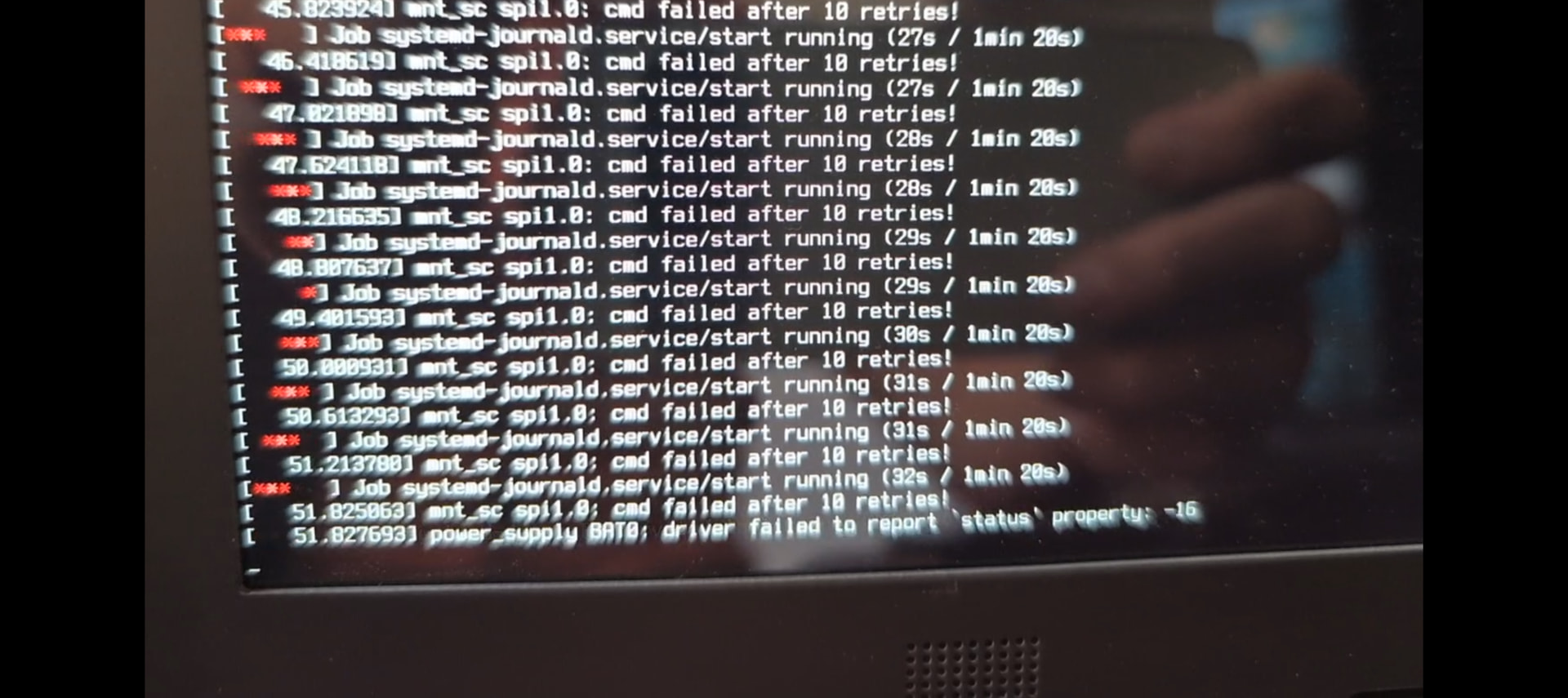
This time, after I restarted the computer, my Pocket got stuck in the boot up sequence. It constantly spews the same message and posts “driver failed to report ‘status’ property: -16”
I have tried to create a recovery SD card, plugged it in, rebooted, and still receive the following logs. Is there anything else I can try?
Edit2: I was able to boot into my OS just fine without an SD recovery - I just had to leave it on for a few minutes even with the flood of logs as in the screenshot. I just updated everything per instructions and rebooted. I still saw the messages just like in my screenshot. It wasn’t until I toggled the standby power switch to “off” then back “on” did it seem to boot normally. My waybar was not showing after logging in, though, so I started the GNOME firmware program and realized I didn’t upgrade the “Pocket Reform System” After doing so, I restarted, and everything is good now.
Glad to hear that you managed to fix the problem in the end! If your system had not booted, you could’ve upgraded the firmware from a vanilla system image on sd-card.
About using a vanilla system via SD: what was kind of scary about this situation was that it had the same symptoms while booting to SD. I was worried it was bricked because I didn’t realize I had to wait a few minutes to boot to SD or emmc. After reading more of this thread I realized it was a waiting game and that I could even use my original installation - which was better since waybar UI was broken and it had my saved network credentials, making it easier to finish upgrading.
Several people are running into this “waiting game” so I filed a bug here, it would be good to convince systemd-journald not to wait forever there https://source.mnt.re/bugs/bugs/-/work_items/58
I took the plunge and rebooted the device anyway as I wasn’t sure how much battery I had left. Everything seems to be ok and is back to booting normally now.
I’d still like to know how to access the above information though.
You can access the version of packages on your system using your package manager, which is dpkg (use dpkg -l) or any of its front-ends like apt (apt-cache policy or apt-cache show). Or you run sudo reform-check which gives you the output you want in the first few lines. It might look something like this:
I: Contents of /proc/device-tree/model: MNT Pocket Reform with i.MX8MP Module
I: `uname -a` output: Linux hostname 7.1.10-mnt-reform-arm64 #1 SMP PREEMPT Debian 7.1.10-1+reform20260826T130932Z (2026-08-2 aarch64 GNU/Linux
I: Version of linux-image-mnt-reform-arm64: 7.1.10-1+reform20260826T130932Z
I: Version of reform-tools: 1.88-1+reform20260817T102547Z+1
I: Version of system image: System Image v5: 2026-08-13
I: Version of system controller firmware: 20260819
I: Version of keyboard firmware: 20260819
As you can see it conveniently also outputs the version of the firmware you have installed.
Probably the missing instructions were supposed to list how to access the system controller version by accessing the oled menu and pressing s to get to the status screen.
My keyboard used to behave like this (repeated inputs, disconnects, often requiring resets) until I got a repair under warranty, but since this update it’s started up again
Yes, I still have to reset trackball or keyboard from time to time - last time today when I wasn’t able to stop playing sound until I had a reset made. Also the repeated keystrokes still appear. I got a bit used to it as it doesn’t happen too often…
Btw.:
The behavior of the screen has improved significantly. I didn’t notice the screen remaining dark after boot. Sometimes barebox isn’t visible, only the ongoing boot process.
I had the “half screen issue” some times but a reboot now solves this immediately.