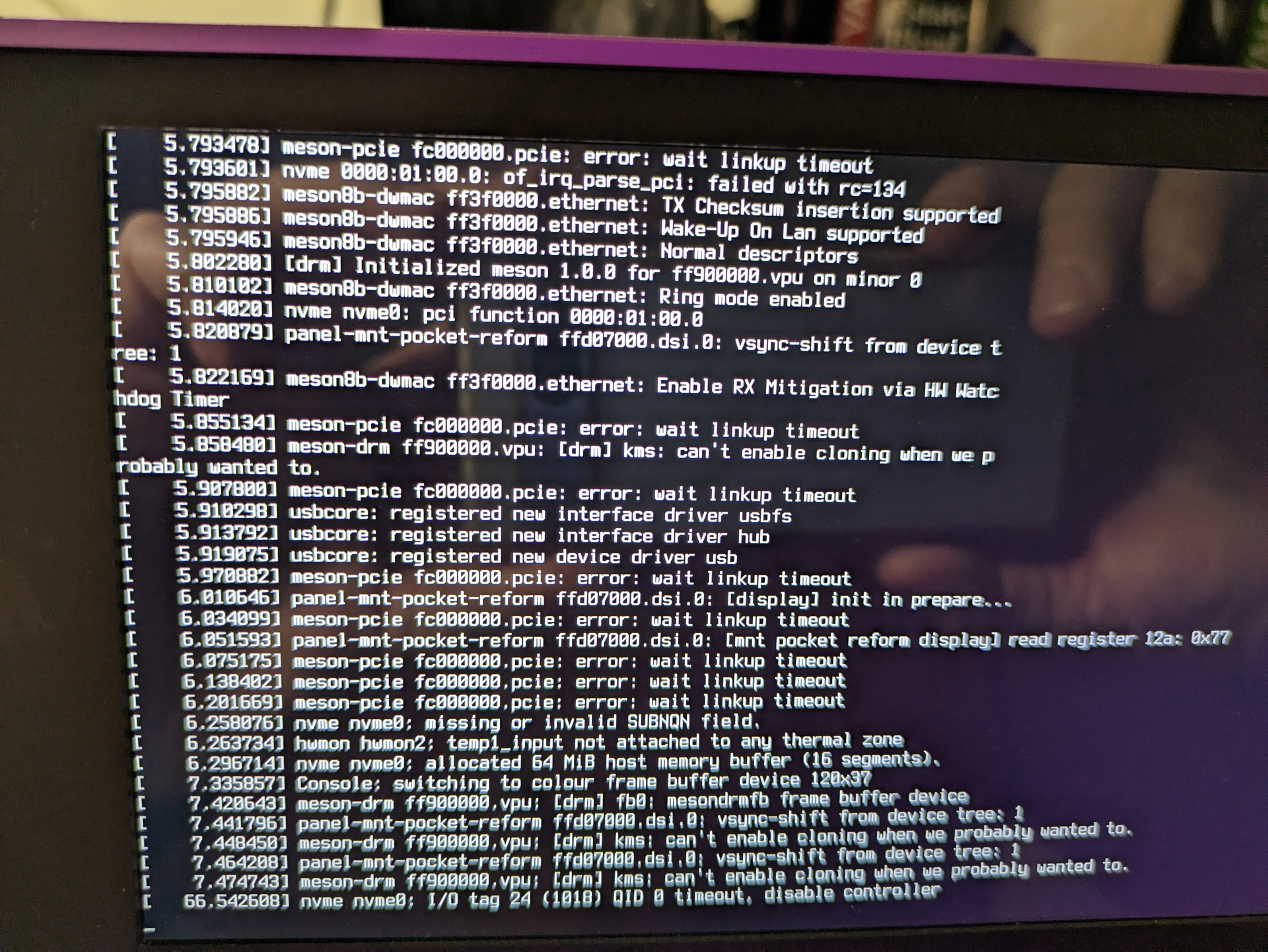
Since I’ve been directed to make a new thread. Here’s what I’ve experienced.
A few days ago I did a standard apt update && apt upgrade on my Pocket Reform A311D which pulled in kernel 6.18.3, then shut the machine down. Came back to it yesterday and it wouldn’t boot. The LUKS prompt never appeared and the encrypted NVMe wasn’t being recognized at all. After the failed attempts to find the root volume, it dropped to BusyBox. That’s when I discovered the keyboard was completely dead, both internal and external USB keyboards did nothing, though the OLED menu still responded to keypresses. Tried the “Reset USB” option from the OLED menu, multiple reboots, power cycles and nothing helped.
Next, I grabbed the latest system image and flashed it to an SD card. Same problem, no GUI and keyboard was still dead. In fact, nothing USB was recognized. I tried an external keyboard and USB ethernet adapter. I then found an older image (from June 2025) and tried that. I booted from the SD card with the June 2025 image and the keyboard worked, which seemed to confirm it was a software issue with the new kernel. I then downloaded the image from November 2025 and booted from it. Still worked. From there I unlocked my encrypted NVMe drive, mounted it, and chrooted in.
The temporary fix was just removing the broken kernel:
apt remove linux-image-6.18.3-mnt-reform-arm64
apt-mark hold linux-image-mnt-reform-arm64
The hold prevents the meta-package from pulling in the broken kernel again on the next upgrade.
Rebooted without the SD card and it came right up on 6.17.13 with a working keyboard.
This indeed sounds like a kernel regression. I’m going to pin this to inform other A311D users of this issue. Do you have a UART adapter to get some kernel logs? Maybe there is something useful in them. Otherwise somebody has to bisect the kernel betwene 6.17 and 6.18 to find out where it broke.
I tried to chroot the nvme and then get rid of 6.18.3, but it said it wasn’t installed which might have just been an outcome of some of the debugging so ended up trying to run reform-emmc-bootstrap again and it downloaded 6.18.5 and that seems to boot fine!
I have been able to get the board booting externally on SD debian 10. Currently zeroing the EMMC. After that I hope to be able to boot the pocket via SD card.
OK Short version of A311D u-boot recovery.
Use cm4 IO board to reflash the EMMC with android, Then start flash again and disconnect at 7%. Then they system should be able to boot BPI debian image off SD card. Then you can zero the EMMC with dd.
Now i can boot to the SD card. and hopefully recover my old system.
@josch I may need tips to reinstall uboot to the emmc so I can boot the NVME drive after I fix the nvme via chroot.
I have a bunch of comments and questions regarding the u-boot log you posted. Technically it’s not even a u-boot log because your bootloader doesn’t even get as far as loading u-boot. Could you start a new thread where you explain what you did and how you ended up in this situation? I think this would be useful to help others avoiding to run into the same situation. Especially because most people probably don’t have a cm4io board around with which they could fix this. I think it would be best to have this discussion in a new thread instead of hijacking this one.
I gave it shot. 6.18.5 is preventing my NVMe from being discovered. The difference here is that the keyboard works now. I ended up using the same process to return to functioning machine. e.g. Booting from SD, chrooting into the NVMe, removing the kernel (6.18.5) and marking linux-image-mnt-reform-arm64 as hold.
I tried reproducing your problem on classic Reform and was unable to get your results. The problem is maybe specific to the Pocket Reform.
m@m:~$ lsblk
NAME              MAJ:MIN RM   SIZE RO TYPE  MOUNTPOINTS
mmcblk1           179:0    0  14.6G  0 disk
├─mmcblk1p1       179:1    0   488M  0 part
└─mmcblk1p2       179:2    0  14.1G  0 part
nvme0n1           259:0    0 931.5G  0 disk
└─reform_crypt    254:0    0 931.5G  0 crypt
  ├─reformvg-swap 254:1    0     8G  0 lvm
  └─reformvg-root 254:2    0 923.5G  0 lvm   /mnt
mmcblk1boot0      179:256  0     4M  1 disk
mmcblk1boot1      179:512  0     4M  1 disk
mmcblk0           179:768  0  29.7G  0 disk
├─mmcblk0p1       179:769  0   488M  0 part  /boot
└─mmcblk0p2       179:770  0  29.2G  0 part  /
m@m:~$ uname -a
Linux m 6.18.5-mnt-reform-arm64 #1 SMP PREEMPT Debian 6.18.5-1+reform20260117T144105Z (2026-01-1 aarch64 GNU/Linux
m@m:~$ cat /proc/device-tree/model
MNT Reform 2 with BPI-CM4 Module
m@m:~$ ls /mnt
bin  boot  chroot  core.102023  dev  etc  home  initrd.img  initrd.img.old  lib  lib64  lost+found  media  mnt  mnt2  proc  root  run  sbin  srv  sys  tmp  usr  var  vmlinuz  vmlinuz.old
m@m:~$ cat /proc/device-tree/chosen/u-boot,version
2024.04 MNT Reform 2 with BPI-CM4 Module 2026-01-11-g25049ad5-dirty
m@m:~$ dpkg-query --show --showformat '${Version}' reform-tools
1.83-2+reform20260117T111126Z+1
As you can see from the output above, I’m on kernel 6.18.5 with latest u-boot 2026-01-11, latest reform-tools and am perfectly able to mount my root partition on encrypted NVMe.
I have been able to get the NVME to operate correctly under 6.18.5 by updating and reinstalling all the main linux-image packages and headers. I am not sure of the cause.
Jan 25 21:26:14 rescuemnky kernel: nvme 0000:01:00.0: of_irq_parse_pci: failed with rc=134
Jan 25 21:26:14 rescuemnky kernel: nvme nvme0: pci function 0000:01:00.0
Jan 25 21:26:14 rescuemnky kernel: nvme 0000:01:00.0: Refused to change power state from D3hot to D0
Jan 25 21:26:14 rescuemnky kernel: nvme 0000:01:00.0: probe with driver nvme failed with error -22
The drive does show in lspci
So weird I posted above running off sd card rebooted, pulled sd card now it booted off EMMC/NVME. So it worked this boot?
Let me guess, if you reboot you have no nvme again?
Is your u-boot still on sd-card with that part of your emmc zeroed out or did you flash u-boot to emmc? Which version of u-boot are you running right now?
We pulled u-boot 2026-01-11 for RK3588 because it created problems with nvme drives. Maybe A311D is affected as well and this is actually not about the kernel but about the u-boot version?
Yesterday I tried to reproduce the problem on RK3588 and tested the following SSDs:
taifast p1000 1tb (default pocket reform ssd)
wd blue sn550 1tb
patriot p320 128gb
verbatim vi3000 256gb
With none of those I was able to reproduce the issues on RK3588 and u-boot 2026-01-11. I did 3 cold boots each in case it’s flaky.
Thank you for the clarification on u-boot priority. I am now running with my EMMC boot0 zeroed out. 2026-01-28 (i think may be 27) flashed to the SD card perfectly. Unfortunately a working completely updated Reform Image fails to boot after u-boot update.
Should I move u-boot issue to a new topic?
Side note(Fresh SD Card images): The Debian Trixie image will not boot with zeroed emmc boot0. The November Pocket-Reform A311D image does boot.
Thank you for asking but I’m still unsure about the actual nature of the issue, so I’m fine with continuing to explore it here.
The latest reform-tools release added the hashes for 2026-01-28 on a311d.
We have seen the same with RK3588. Debian Trixie with backports has kernel 6.17. That kernel will not boot with u-boot which has the changed nvme boot order. Changing the boot order back to how it was before makes 6.17 boot as well. Everything works on RK3588 with kernel 6.18.
Thank you for trying that. That is indeed what is expected and it confirms that nothing is wrong with your hardware, so this is a good test.
I think something we can try now is the same we did on RK3588. Could you perform the following test:
This setup should fail to boot in the same way as you reported that your “completely updated Reform Image fails to boot” (because the package versions should be the same).
You can flash a custom u-boot file using the --image option of reform-flash-uboot. You can also use dd manually but you have to be careful because a311d u-boot expects the first 512 bytes to not be written out. If you do, you would overwrite your partition table. Not a big problem for an sd-card image you can just flash again but an annoyance.
That this change is responsible is just a hunch because your problem is nvme related and this is the only nvme related change since the last working uboot tag (2024-12-23).
But in contrast to RK3588 where the nvme change was about the only non-cosmetic change, there are a couple of more changes which can break things. Mind though, that of course before releasing this u-boot version I tested it on my own a311d and here it works. So I’m grateful that you help tracking this down because I’m still unable to reproduce the issue.
I’m looking forward to the results of your experiments!