I’ve been using my (now discontinued) ZSA Planck EZ as the keyboard when I’m working on my desk with an external monitor for years now (more than 10 probably?). It is an ortholinear keyboard (with one row less than the Pocket Reform keyboard), and one of the reasons I was very excited to get the Pocket Reform  I recently noticed that I’m confusing myself quite a lot when switching between the built-in keyboard of the Pocket and my Planck (which I use with both my Pocket and work notebook when docked). I therefore want to align the keyboard layouts
Given how used I am to my Planck, I would prefer to bring the Pocket closer to the Planck. The Planck has a web based software to configure a keyboard layout called Oryx as well as a flashing tool. I’m not sure if there’s something similar for the Pocket.
The Planck has three layers, the upper and lower layers can be used via these two keys:
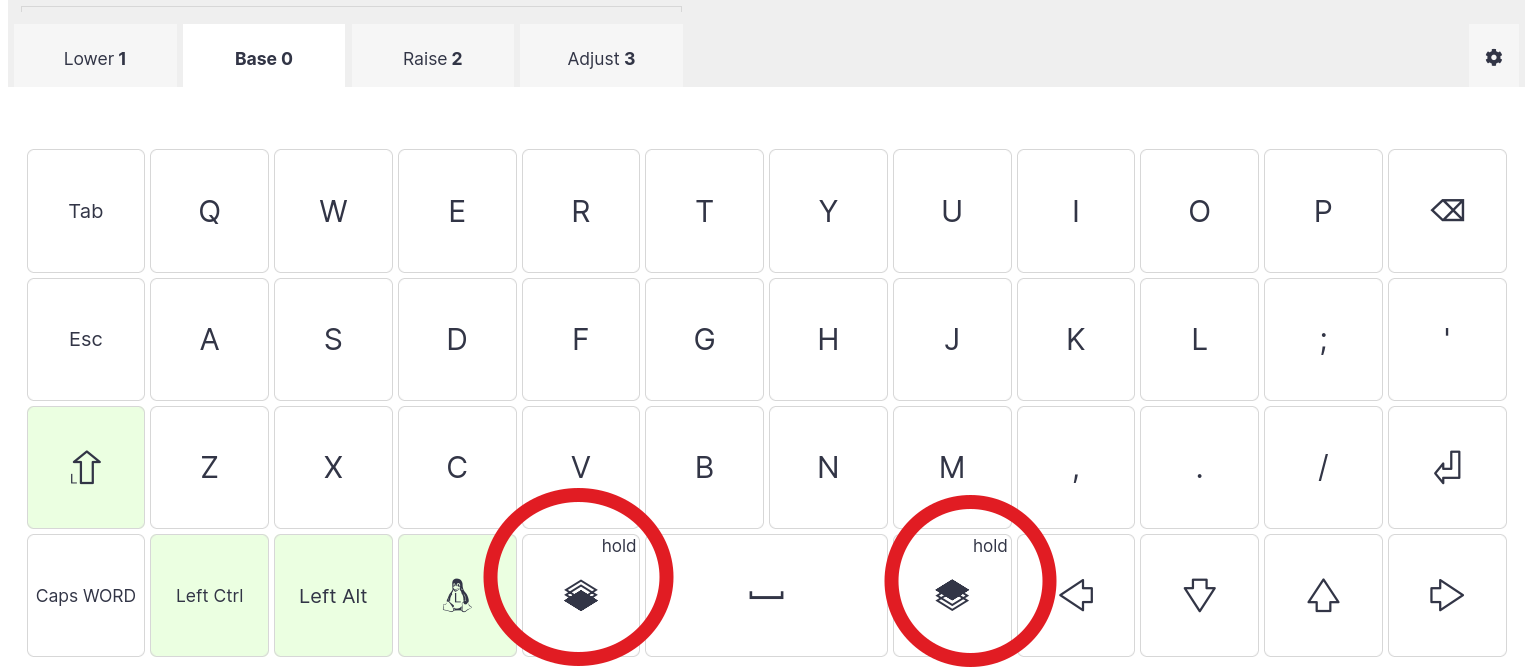
So, for example, pressing the lower and L key together gives me {. Is it possible to configure my Pocket Reform keyboard with the same behavior? If so, could you give me a hint on where I can find out more about that?
 And thanks a lot for your effort of porting QMK,