Since yesterday’s update && upgrade (which I ran again today), I’ve noticed three things:
The SWAY bar fluctuates between 0% and 100% battery charge every minute.
The OLED display always shows 100% battery charge (even after 2 hours of use).
The laptop shuts down without warning.
That’s terrible. I have reverted the apiv3 changes and the pipeline is running now and should have its results in the MNT Debian repos in 45 minutes.
Sorry for the mess. I have tested the lpc module on A311D classic Reform and RK3588 Pocket Reform but apparently not thoroughly enough.
Moin Josch,
Thank you for your tireless work. I’ve run update && upgrade and will keep an eye on it.
Best regards, Micha
Moin Micha,
you probably just short-handed it but just in case (and of course for everybody else reading this) make sure to not just use “apt upgrade” when you use Debian unstable but use “apt full-upgrade” instead.
This is documented differently in the Reform handbook and I wrote a MR with the full rationale for this recommendation here: src/source/software.rst: suggest using "apt full-upgrade" instead of "apt upgrade" (!22) · Merge requests · Reform / reform-handbook · GitLab
I hope your problem is fixed now. In IRC minute wondered yesterday how the problems you saw could’ve happened. One theory was that you are maybe running a custom keyboard firmware? Do you know which keyboard you have?
1 Like
Hi Josch,
I updated the keyboard firmware a few weeks ago as described here:
I didn’t install a custom one.
Thanks for pointing out the “apt full-upgrade” option. I wasn’t aware of that.
After running the apt full-upgrade, the displays (OLED and SWAY bar) are back in sync, and the sudden shutdowns have stopped.
However, both displays remain at 100%—even after 3 hours of battery use.
I clearly ran into this bug, although it worked differently on my machine.
For me (v2.5 motherboard, rk3588), I saw the LPC display consistently show the right battery voltage and level. The OS, however, was throwing tons of error messages about not being able to communicate (like in the other thread) and the battery display in Gnome was swinging wildly between 100 and 11 and 30 and 5 and 0 every few minutes, regardless of what the LPC showed or whether I was plugged in or not. And if it stayed on 0 too long, UPower would shut it down. I did try and figure out how to configure UPower to not do this, only to discover that there is no way to override this, apparently (although it looks like Arch has a package with a patched UPower that allows “ignore” as an option).
I’ve just updated to the most recent release of reform2-lpc-dkms (deb version 1.86-1+reform20260327T215213Z+1 via apt full-upgrade, so other stuff also updated) and now the OS and the LPC displays agree again.
I am not seeing either display stuck at 100% (right now, both are at 95%, at least under Gnome)
Thanks for sharing your observations. Today, after charging and discharging the battery several times, I can confirm that both displays are working with their usual accuracy again.
Thanks again to Josch!
1 Like
Hi,
Lucie suspects that the problem might’ve been that you were using a firmware with a different version string than the version logic was prepared to handle and submitted a potential fix. So I’d have two requests if you find the time:
- what keyboard and what keyboard firmware (and which version) are you running?
- if you like, you can try out a version of reform2-lpc-dkms with the potential fix applied by adding this repository to your apt sources.list:
This should give youdeb [trusted=yes arch=arm64] https://source.mnt.re/reform/reform-debian-packages/-/jobs/19560/artifacts/raw/repo reform mainreform2-lpc-dkmsversion1.86-1+reform20260410T060514Z+1
Let me know if I can assist you in some way. Thank you! 
Hi Josch,
Thank you very much for continuing to look into my problem and trying to get to the bottom of it. I’m afraid my knowledge isn’t sufficient to answer these questions.
The keyboard is the original one (shipped in mid-2025). How do I find out the firmware version?
The sources.list (etc/apt/sources.list.d/mntre.sources) looks like this:
Types: deb
URIs: Index of /reform-debian-repo/
Suites: reform
Components: main
Architectures: arm64
Trusted: yes
Where should I insert the line?
Best regards, Micha
Then it’s probably the keyboard V4. It should be an RGB keyboard. You can make sure by looking at the badge printed on the silkscreen but for that you’d have to open up your unit. It’s sufficient to compare that the layout looks like this one (three space keys and not two alt keys between two space keys): MNT Reform USB Standalone Keyboard - MNT Research Shop
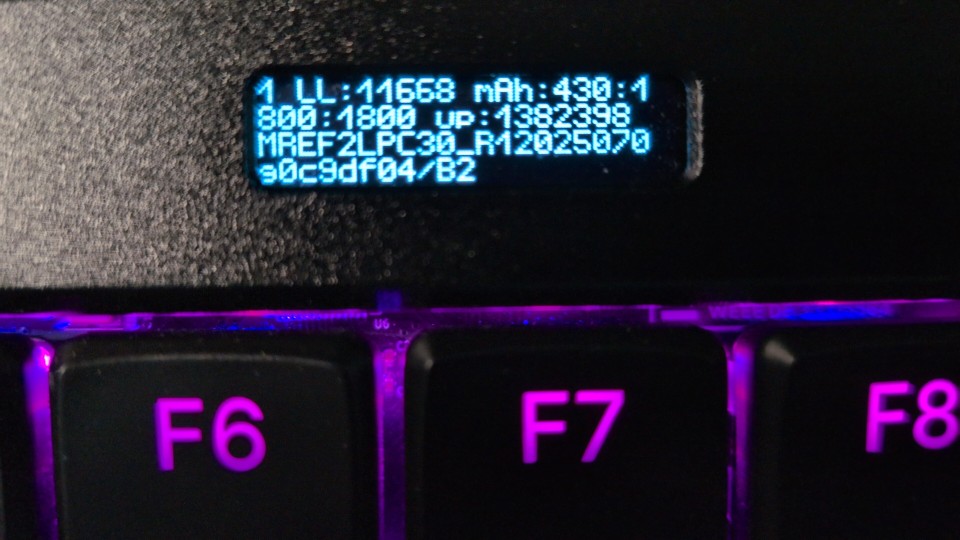
You can find that in the “System Status” overview in the OLED screen. Should be in the last line.
It is easiest to just create a new file, for example /etc/apt/sources.list.d/experiment.list and then put that line inside that file. After you did that, run:
sudo apt update
sudo apt full-upgrade
And then make sure that you get the expected version of reform2-lpc-dkms, for example by looking at the output of reform-check or by looking at the relevant line of dpkg -l:
dpkg -l | grep reform2-lpc-dkms
Once you want to undo your changes, remove /etc/apt/sources.list.d/experiment.list and the next time the repositories update the package versions, the packages from the custom repository will be upgraded back to the new official versions. You can ping me so that I manually trigger a rebuld.
Hi Josch,
I have the three buttons and RGB. So it’s the V4.
Here is the display in the system status:
I created the experiment.list. The output of dpkg -l | grep reform2-lpc-dkms is:
ii reform2-lpc-dkms 1.86-1+reform20260410T060514Z+1 all dkms driver sources for Reform 2 LPC11U24
Good. This looks like you received the new reform2-lpc-dkms package. Do you experience the problems you had before or does everything run okay right now?
Also, did you ever flash the keyboard firmware or do you still have on it what was flashed onto it by MNT?
As far as I can remember, everything is still in its original condition.
Do you experience the problems you had before or does everything run okay right now?
Everything is going smoothly at the moment. Thank you for handling this so meticulously!
1 Like
We talked about this in IRC today. According to your OLED, your keyboard firmware was built from git commit 0c9df04 and not a tagged release. It is possible that this was a slip-up at MNT. The code which parses the firmware tries to turn the version string into an integer which works for the regular firmware version which is of the form YYYYMMDD. But a git hash cannot be parsed as a string and the function that attempts to do so fails. This should be fixed in this MR: Reapply "lpc: add apiv3 support with checksumming, filter some noise when fully charged on AC" (!166) · Merge requests · Reform / MNT Reform Tools · GitLab
Since you are on a “custom” firmware you will currently not be using apiv3. Should this ever become an issue to you, you can just flash a proper tagged firmware release. Shoot another message if you need assistance with doing that.
Thanks, Josch. Everything’s running smoothly for now. If any problems come up in the future, I’ll let you know.
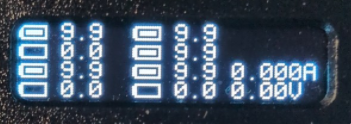
I need to revisit this issue. Unfortunately, I was so engrossed in a FreeCAD design that I forgot to plug in the USB cable from the charger. The result was a sudden shutdown. I figured it wasn’t a big deal and plugged in the charger. After a short charging time, the Reform was up and running again. However, the issue with the 100% display has returned. The OLED and battery indicator in the SWAY window show 100% and don’t drop even after hours.
Every now and then, the OLED flashes and displays strange values:
Okay, I think it might be time for you to upgrade your keyboard and mainboard firmware. Lucie has tagged a new release just two days ago with all the new features in it and with a proper tag this time: 2026-04-21 · Reform / reform · GitLab
EDIT: So behind that link you have a convenience script to update your keyboard firmware. Do you need assistance with upgrading your mainboard firmware as well? The release artifacts are here Artifacts · build (#20233) · Jobs · Reform / reform · GitLab and you need a second computer.