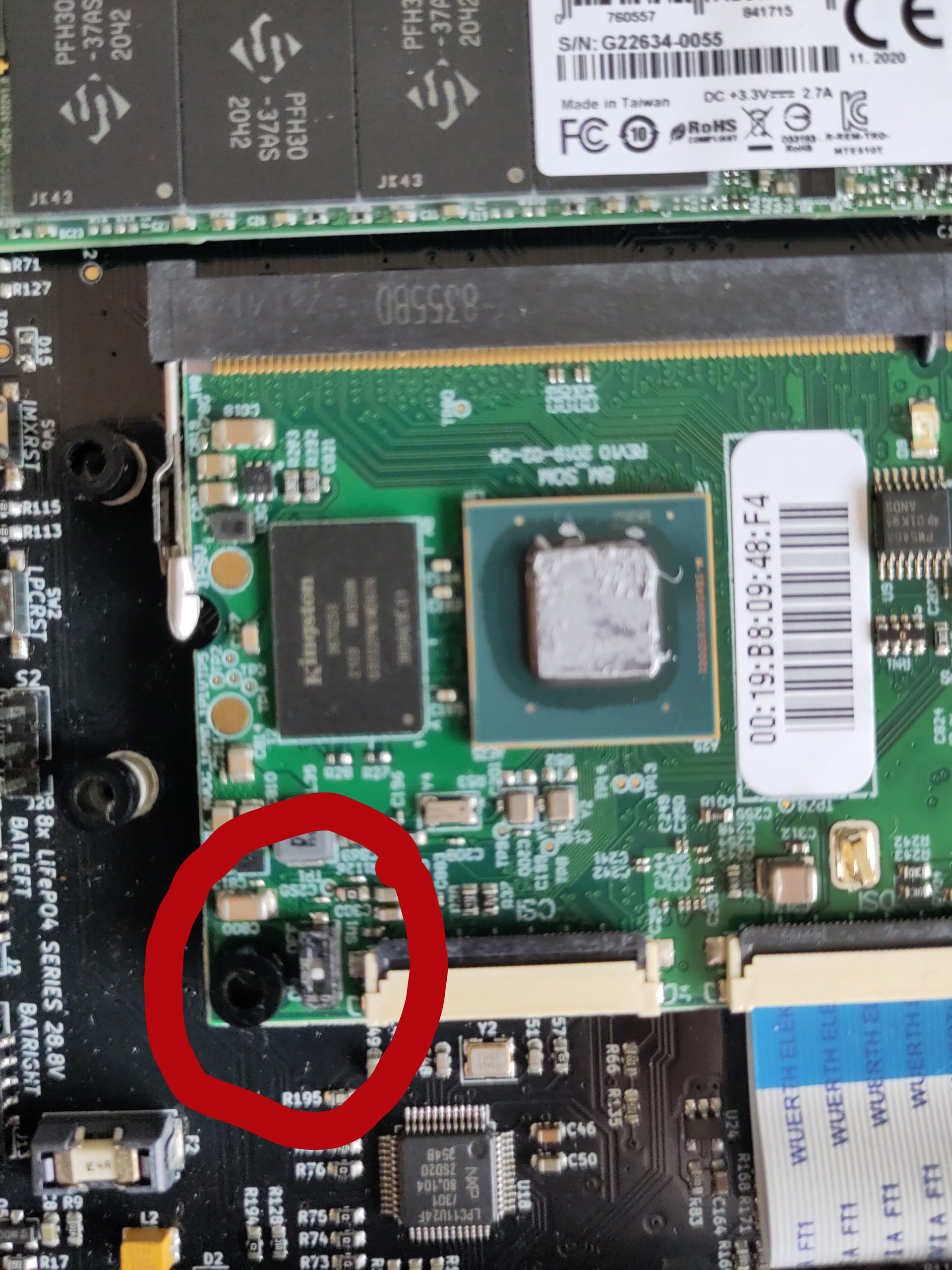
Did the script finish successfully?
Yes
What is the position of the DIP switch on your imx8mq board?
The DIP switch LPCPROG is set to 1.
When you say “latest image” which job number did you use to download it from?
$ sha256sum reform-system-imx8mq.img.gz
a11f56e8a14e4b6d3cb9be93ce1acd98839de6133edde37d6a7dbd5a041d93bc  reform-system-imx8mq.img.gz
Output of installation script:
$ sudo reform-setup-encrypted-disk
This will ERASE ALL DATA from your NVMe SSD.

Are you sure you want to proceed? [y/N] y

WARNING!
========
This will overwrite data on /dev/nvme0n1 irrevocably.

Are you sure? (Type 'yes' in capital letters): YES
Enter passphrase for /dev/nvme0n1:
Verify passphrase:
Enter passphrase for /dev/nvme0n1:
  Physical volume "/dev/mapper/reform_crypt" successfully created.
  Volume group "reformvg" successfully created
  Logical volume "swap" created.
Setting up swapspace version 1, size = 4 GiB (4294963200 bytes)
no label, UUID=cbf9b0af-f1ea-4190-b75f-b50d090a4578
  Logical volume "root" created.
mke2fs 1.47.4 (6-Mar-2025)
Creating filesystem with 61461504 4k blocks and 15368192 inodes
Filesystem UUID: 0edb9bdd-1e4a-4840-9323-6464a2837046
Superblock backups stored on blocks:
	32768, 98304, 163840, 229376, 294912, 819200, 884736, 1605632, 2654208,
	4096000, 7962624, 11239424, 20480000, 23887872

Allocating group tables: done
Writing inode tables: done
Creating journal (262144 blocks): done
Writing superblocks and filesystem accounting information: done


The encrypted NVMe SSD is now set up. Do you want me to run reform-migrate now as well? [y/N] y
  6,486,591,406  95%   11.65MB/s    0:08:51 (xfr#177375, to-chk=7325/262741)
file has vanished: "/var/cache/man/CACHEDIR.TAG"
  6,759,969,377  99%   11.68MB/s    0:09:12 (xfr#184178, to-chk=0/262741)
rsync warning: some files vanished before they could be transferred (code 24) at main.c(1356) [sender=3.4.4]
Your /boot partition will be on eMMC by default. Do you want it on the SD-Card instead? [y/N] n
I: Using partition on eMMC for /boot: /dev/mmcblk0p1.
This script selects your preferred boot medium. It writes your choice to the file /etc/fstab

This script will copy the contents from the old /boot partition
/dev/mmcblk1p1 (SD-card) to the new /boot partition mmcblk0p1 (eMMC) and delete all
files from the latter that were not present in the former.
Are you sure that you want to remove the contents of mmcblk0p1 (eMMC)
and replace it with the contents of /dev/mmcblk1p1 (SD-card)? [y/N] y
commenting original /etc/fstab contents
update-initramfs: Generating /boot/initrd.img-7.0.10-mnt-reform-arm64
WARNING: Unknown key type EIGHT_LEVEL_WITH_LEVEL5_LOCK
WARNING: Unknown key type EIGHT_LEVEL_WITH_LEVEL5_LOCK
…
WARNING: Unknown key type EIGHT_LEVEL_ALPHABETIC_WITH_LEVEL5_LOCK
WARNING: Unknown key type EIGHT_LEVEL_ALPHABETIC_WITH_LEVEL5_LOCK
WARNING: Unknown key type EIGHT_LEVEL_ALPHABETIC_WITH_LEVEL5_LOCK
WARNING: Unknown key type EIGHT_LEVEL_ALPHABETIC_WITH_LEVEL5_LOCK
…
WARNING: Unknown key type EIGHT_LEVEL_WITH_LEVEL5_LOCK
WARNING: Unknown key type EIGHT_LEVEL_WITH_LEVEL5_LOCK
WARNING: Unknown key type EIGHT_LEVEL_WITH_LEVEL5_LOCK
I: skipping reform_set_root in favour of flash_kernel_set_root
Using DTB: freescale/imx8mq-mnt-reform2.dtb
Installing /usr/lib/linux-image-7.0.10-mnt-reform-arm64/freescale/imx8mq-mnt-reform2.dtb into /boot/dtbs/7.0.10-mnt-reform-arm64/freescale/imx8mq-mnt-reform2.dtb
Taking backup of imx8mq-mnt-reform2.dtb.
Installing new imx8mq-mnt-reform2.dtb.
flash-kernel: installing version 7.0.10-mnt-reform-arm64
Generating boot script u-boot image... done.
Taking backup of boot.scr.
Installing new boot.scr.
Your /boot partition is on emmc (/dev/mmcblk0p1).
I: The bootloader will prefer the first partition on SD-card over the first partition on eMMC
I: Your current system has its /boot mounted from SD-card.
I: You requested to configure a new /boot on eMMC
I: Instead of just rebooting, power off the system.
I: Then remove the SD-card.
I: Lastly, power the system on again.
I: Power off your Reform 2 by running 'systemctl poweroff'.
I: WARNING: If you have the DIP switch on your i.MX8MQ set to load u-boot
I:          from SD-card instead of eMMC, you cannot boot the system without
I:          an SD-card inserted. In that case, either:
I:            a) mv /boot/boot.scr /boot/boot.scr.bak
I:            b) or put in a different SD-card with u-boot but without /boot/boot.scr
  0 logical volume(s) in volume group "reformvg" now active
You can now reboot into your encrypted System.
NOTE: I did plugin an USB device during the installation process (mouse).
Finial result it does not work without the SD card.
Furthermore, I did mv /boot/boot.scr /boot/boot.scr.bak on the SD Card. However, now even with the SD Card inserted the MNT reform is stuck in a boot loop.
Related, what is your version of reform-tools?
What command do I have to run to get it?
What command do I have to run to figure that out?
The version popping up in the in the boot loop is: u-boot 2018.07 MNT Reform 2.
I have a USB to TTL Serial Cable Adapter from ThinkPenguin laying around (never used it). Similar to this device: USB to TTL Serial Cable Adapter For Hacking On Routers (TPE-USBSERIAL) | ThinkPenguin.com.
Does this seem like the device you are looking for?