Reform-setup-encrypted-disk fails

Hi, I wanted to use the reform-setup-encrypted-disk script to encrypt the m2 and make it bootable.

The script reports:

“I: Power off your MNT Reform by running ‘systemctl poweroff’.

0 logical volume(s) in volume group “reformvg” now active

You can now reboot into your encrypted System.”

However, after turning it off and restarting it, the display remains dark.

I have read several posts about similar problems here in the forum, but have not found any decisive clues. I don’t know what to do.

The reform can now only be started via SD-Card. That’s not what I wanted to achieve…

Any ideas?

Hi,

we need more details to be able to help:

  • classic Reform or Pocket Reform?
  • which SoM? (imx8mq, rk3588-dsi, rk3588-nondsi, a311d…)
  • was it the latest system image? do you have the job id?
  • did you use the reform-system-any image or the target specific image?
  • which u-boot version do you have on eMMC?
  • which options did you select when you ran reform-setup-encrypted-disk?
  • is this a new installation or is there data you want to preserve?
  • do you happen to have a usb-uart adapter to get serial output?

Some of the answers above are provided by running sudo reform-check.

Hi Josch,

Here, as far as I can, are the answers

Classic Reform

RK3588-dsi

13482 (the latest)

system-image/reform-system-rk3588-dsi.img

U-Boot version: 2024.10-g424c714eb247-dirty

The encrypted NVMe SSD is now set up. Do you want me to run reform-migrate now as well? [y/N] y
Your /boot partition will be on eMMC by default. Do you want it on the SD-Card instead? [y/N] N
Are you sure that you want to remove the contents of mmcblk0p1 (eMMC)
and replace it with the contents of /dev/mmcblk1p1 (SD-card)? [y/N] y

new installation

Unfortunately, I don’t have a USB-UART Adapter.

Thanks for your help!

micha@reformmk:~$ sudo reform-check
[sudo] password for micha: 
I: Contents of /proc/device-tree/model: MNT Reform 2 with RCORE-DSI RK3588 Module
I: `uname -a` output: Linux reformmk 6.16.9-mnt-reform-arm64 #1 SMP PREEMPT Debian 6.16.9-1+reform20250910T145641Z (2025-09-1 aarch64 GNU/Linux
I: Version of linux-image-mnt-reform-arm64: 6.16.9-1+reform20250910T145641Z
I: Version of reform-tools: 1.79-1+reform20250926T072932Z+1
I: Version of system image: System Image v5: 2025-08-31
I: Version of LPC firmware: MREF2LPC 30_R1 20250701
I: Version of U-Boot: 2024.10-g424c714eb247-dirty
I: Latest version of U-Boot: 2025-05-06
I: probably booting via /boot/extlinux/extlinux.conf (/boot/boot.scr also exists)
I: Mount source of /: /dev/disk/by-label/reformsdroot (n.a.)
I: Mount source of /boot: /dev/mmcblk1p1 (SD-card)
I: MNT Reform Desktop meta-package is not installed: reform-desktop-minimal
I: the following files differ from how they are shipped by reform-tools (ignore /var/lib/alsa/asound.state):
??5??????   /var/lib/alsa/asound.state
I: the reform-qcacld2 package package is only required for wifi on the Pocket Reform with i.MX8MP, you can safely remove it unless you plan to go back to the imx8m+
W: eMMC does not contain latest uboot
W: You can update it to the latest version by running as root:
reform-flash-uboot emmc
I: note that updating u-boot on eMMC on your platform is not without risk!
I: SD-card contains the latest u-boot version 2025-05-06
micha@reformmk:~$ 

Thank you! I’ll be able to test this myself on the same hardware earliest by tomorrow. I forgot one missing bit: which SSD do you have installed?

The one built in by MNT: WD Green SN350 1TB.

I just tried what you did and I do not see the problem that you see.

Note that sometimes (how often seems to be different depending on the board) rk3588 fails to init emmc and thus cannot boot. Switching it off and on again usually helps.

If that does not help for you, would it somehow be possible for you to get some serial output? If you have rcore-dsi reform, then you likely also have motherboard 3.0 and then getting serial output is very easily done by connecting another computer to the reform via its usb-c port and running this on the other device:

sudo tio /dev/ttyACM1 -b 1500000

Replace /dev/ttyACM1 with whatever device was chosen when you plugged in the reform via usb-c. You can then see the very early boot messages over serial.

My Dell only has USB-A. So, I connected a USB-A to C cable. I hope that works.

When connecting, /dev ttyACM0 and ttyACM1 are added. I tested sudo tio /dev/ttyACM0 and sudo tio /dev/ttyACM1. After connecting, nothing was displayed during bootup.

micha@dellmk2:/dev$ sudo tio /dev/ttyACM0
[sudo] Passwort für micha: 
[16:20:44.245] tio v2.5
[16:20:44.245] Press ctrl-t q to quit
[16:20:44.245] Connected

Am I understanding the procedure correctly?

Connect with cable
Start Reform
Enter sudo tio /dev/ttyACM1 in the terminal on the second laptop
Reboot Reform

Is that correct?

Yes, it should.

You can connect the cable, start tio and then start the reform. That way you even are able to receive the very early boot messages and do not miss anything. Your reform should show up as acm0 and acm1 even before you have switched it on.
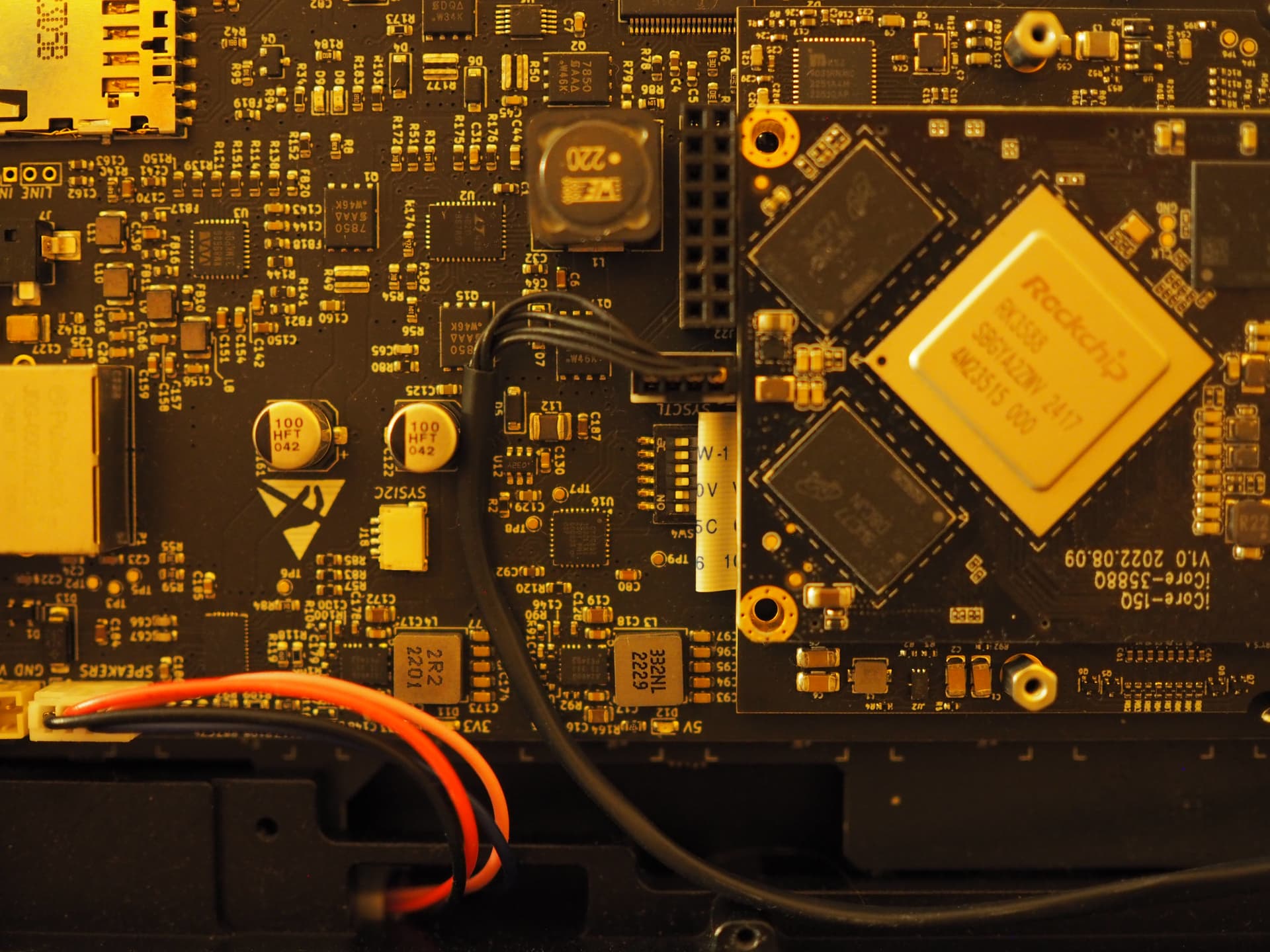
You forgot to supply the baudrate to tio. See the -b 1500000 parameter in my message above.

That two devices show up is normal. This is S1 and S2, see the handbook. RK3588 uses S1 which might correspond to your acm0 device.

I overlooked the build rate.

After entering the command and booting the reform, the terminal window remains blank. After connect, nothing else appears in the terminal.

However, the laptops are connected. When I pull out the USB plug, “Disconnected” immediately appears in the terminal.

micha@dellmk2:~$ sudo tio /dev/ttyACM0 -b 1500000
[sudo] Passwort für micha: 
[22:27:36.159] tio v2.5
[22:27:36.159] Press ctrl-t q to quit
[22:27:36.159] Connected
[22:32:10.991] Disconnected
[22:32:11.991] Warning: Could not open tty device (No such file or directory)
[22:32:11.991] Waiting for tty device..
[22:32:30.010] Connected

Are the boot messages stored elsewhere?

Thank you very much for your support!

Okay, so I believe this has not yet been documented in detail anywhere. Maybe this should go into the handbook, so lets see… Imagine we have two computers: Computer A is your RK3588 RCORE-DSI classic Reform. Computer B is a Dell computer in your case. In my case computer B is a A311D classic Reform which (like your Dell) only has USB-A plugs, so I’m using a USB-C to A adapter with my USB-C cable. I do the following:

1. connect both machines

I plug one end of the cable in the power USB-C of computer A and the other end into computer B. Computer A is off, computer B is on and I can see the following in dmesg:

[Thu Oct  9 23:12:54 2025] usb 1-2.2: new full-speed USB device number 6 using xhci-hcd
[Thu Oct  9 23:12:54 2025] usb 1-2.2: New USB device found, idVendor=04b4, idProduct=0005, bcdDevice= 0.00
[Thu Oct  9 23:12:54 2025] usb 1-2.2: New USB device strings: Mfr=1, Product=2, SerialNumber=0
[Thu Oct  9 23:12:54 2025] usb 1-2.2: Product: USB-Serial (Dual Channel)
[Thu Oct  9 23:12:54 2025] usb 1-2.2: Manufacturer: Cypress Semiconductor
[Thu Oct  9 23:12:54 2025] cdc_acm 1-2.2:1.0: ttyACM0: USB ACM device
[Thu Oct  9 23:12:54 2025] cdc_acm 1-2.2:1.2: ttyACM1: USB ACM device
[Thu Oct  9 23:12:54 2025] usbcore: registered new interface driver cdc_acm
[Thu Oct  9 23:12:54 2025] cdc_acm: USB Abstract Control Model driver for USB modems and ISDN adapters

2. start tio on computer B

I am running this:

[josch@reform] ~ % sudo tio /dev/ttyACM0 -b 1500000 
[23:18:09.878] tio 3.9
[23:18:09.878] Press ctrl-t q to quit
[23:18:09.879] Connected to /dev/ttyACM0

3. start computer A

Immediatel I see the following output in tio on computer B:

DDR 9fa84341ce typ 24/09/06-09:51:11,fwver: v1.18
ch0 ttot10
ch0 ttot10
ch1 ttot10
ch2 ttot10
ch3 ttot10
ch0 ttot16
LPDDR4, 2112MHz
channel[0] BW=16 Col=10 Bk=8 CS0 Row=17 CS1 Row=17 CS=2 Die BW=16 Size=4096MB
ch1 ttot18
channel[1] BW=16 Col=10 Bk=8 CS0 Row=17 CS1 Row=17 CS=2 Die BW=16 Size=4096MB
ch2 ttot16
channel[2] BW=16 Col=10 Bk=8 CS0 Row=17 CS1 Row=17 CS=2 Die BW=16 Size=4096MB
ch3 ttot16
channel[3] BW=16 Col=10 Bk=8 CS0 Row=17 CS1 Row=17 CS=2 Die BW=16 Size=4096MB
Manufacturer ID:0xff
DQS rds:l0,l0 
CH0 RX Vref:35.7%, TX Vref:13.2%,13.2%
DQ rds:h4 h2 h4 h1 h1 h2 h2 h4, h1 h2 h2 h2 h2 h1 h2 h1 

DQS rds:l0,l0 
CH1 RX Vref:33.4%, TX Vref:13.2%,13.2%
DQ rds:l0 l0 h5 h1 l0 l0 h3 h1, h1 h1 h1 l0 l0 h4 h1 h1 

DQS rds:h2,h1 
CH2 RX Vref:36.1%, TX Vref:13.2%,13.2%
DQ rds:h1 h2 h7 h3 h4 h2 h5 h2, h2 h3 h4 h4 h5 h2 h5 h7 

DQS rds:h1,h2 
CH3 RX Vref:36.9%, TX Vref:13.2%,13.2%
DQ rds:h7 h3 h7 h4 h5 h7 h4 h2, h5 h3 h2 h3 h1 h4 h1 h2 

stride=0x2, ddr_config=0x4
hash ch_mask0-1 0x20 0x40, bank_mask0-3 0xa00 0x1400 0x2800 0x0, rank_mask0 0x401000
change to F1: 528MHz
ch0 ttot10
ch1 ttot10
ch2 ttot10
ch3 ttot10
change to F2: 1068MHz
ch0 ttot12
ch1 ttot12
ch2 ttot12
ch3 ttot12
change to F3: 1560MHz
ch0 ttot14
ch1 ttot14
ch2 ttot14
ch3 ttot14
change to F0: 2112MHz
ch0 ttot16
ch1 ttot18
ch2 ttot16
ch3 ttot16
out

U-Boot SPL 2024.10-g424c714eb247-dirty (Oct 08 2025 - 18:06:28 +0000)
Trying to boot from MMC2
NOTICE:  BL31: v2.12.0(release):4ec2948
NOTICE:  BL31: Built : 20:51:55, Oct  7 2025


U-Boot 2024.10-g424c714eb247-dirty (Oct 07 2025 - 20:51:55 +0000)

Model: MNT Reform 2 with RCORE-DSI RK3588 Module
DRAM:  16 GiB
Core:  335 devices, 26 uclasses, devicetree: separate
MMC:   mmc@fe2c0000: 1, mmc@fe2e0000: 0
Loading Environment from nowhere... OK
In:    serial@feb50000
Out:   serial@feb50000
Err:   serial@feb50000
Model: MNT Reform 2 with RCORE-DSI RK3588 Module
[mnt-reform-series-rk3588] setup_usb()
Hit any key to stop autoboot:  0 
Scanning for bootflows in all bootdevs
Seq  Method       State   Uclass    Part  Name                      Filename
---  -----------  ------  --------  ----  ------------------------  ----------------
Scanning global bootmeth 'efi_mgr':
No EFI system partition
Failed to persist EFI variables
No EFI system partition
Failed to persist EFI variables
No EFI system partition
Failed to persist EFI variables
No EFI system partition
Failed to persist EFI variables
No EFI system partition
Failed to persist EFI variables
  0  efi_mgr      ready   (none)       0  <NULL>                    
** Booting bootflow '<NULL>' with efi_mgr
Loading Boot0000 'mmc 1' failed
Loading Boot0001 'mmc 0' failed
EFI boot manager: Cannot load any image
Boot failed (err=-14)
Scanning bootdev 'mmc@fe2c0000.bootdev':
Scanning bootdev 'mmc@fe2e0000.bootdev':
  1  extlinux     ready   mmc          1  mmc@fe2e0000.bootdev.part /extlinux/extlinux.conf
** Booting bootflow 'mmc@fe2e0000.bootdev.part_1' with extlinux
U-Boot menu
1:	Debian GNU/Linux forky/sid 6.16.9-mnt-reform-arm64
2:	Debian GNU/Linux forky/sid 6.16.9-mnt-reform-arm64 (rescue target)
Enter choice: 1:	Debian GNU/Linux forky/sid 6.16.9-mnt-reform-arm64
Retrieving file: /vmlinuz-6.16.9-mnt-reform-arm64
Retrieving file: /initrd.img-6.16.9-mnt-reform-arm64
append: ro no_console_suspend cryptomgr.notests console=ttyS2,1500000 clk_ignore_unused cma=256M swiotlb=65535 console=tty1
Retrieving file: /dtbs/6.16.9-mnt-reform-arm64/rockchip/rk3588-mnt-reform2-dsi.dtb
## Flattened Device Tree blob at 12000000
   Booting using the fdt blob at 0x12000000
Working FDT set to 12000000
   Loading Ramdisk to ea97c000, end eceae983 ... OK
   Loading Device Tree to 00000000ea960000, end 00000000ea97baa4 ... OK
Working FDT set to ea960000

Starting kernel ...
1 Like

I have two ideas for why you see nothing on serial.

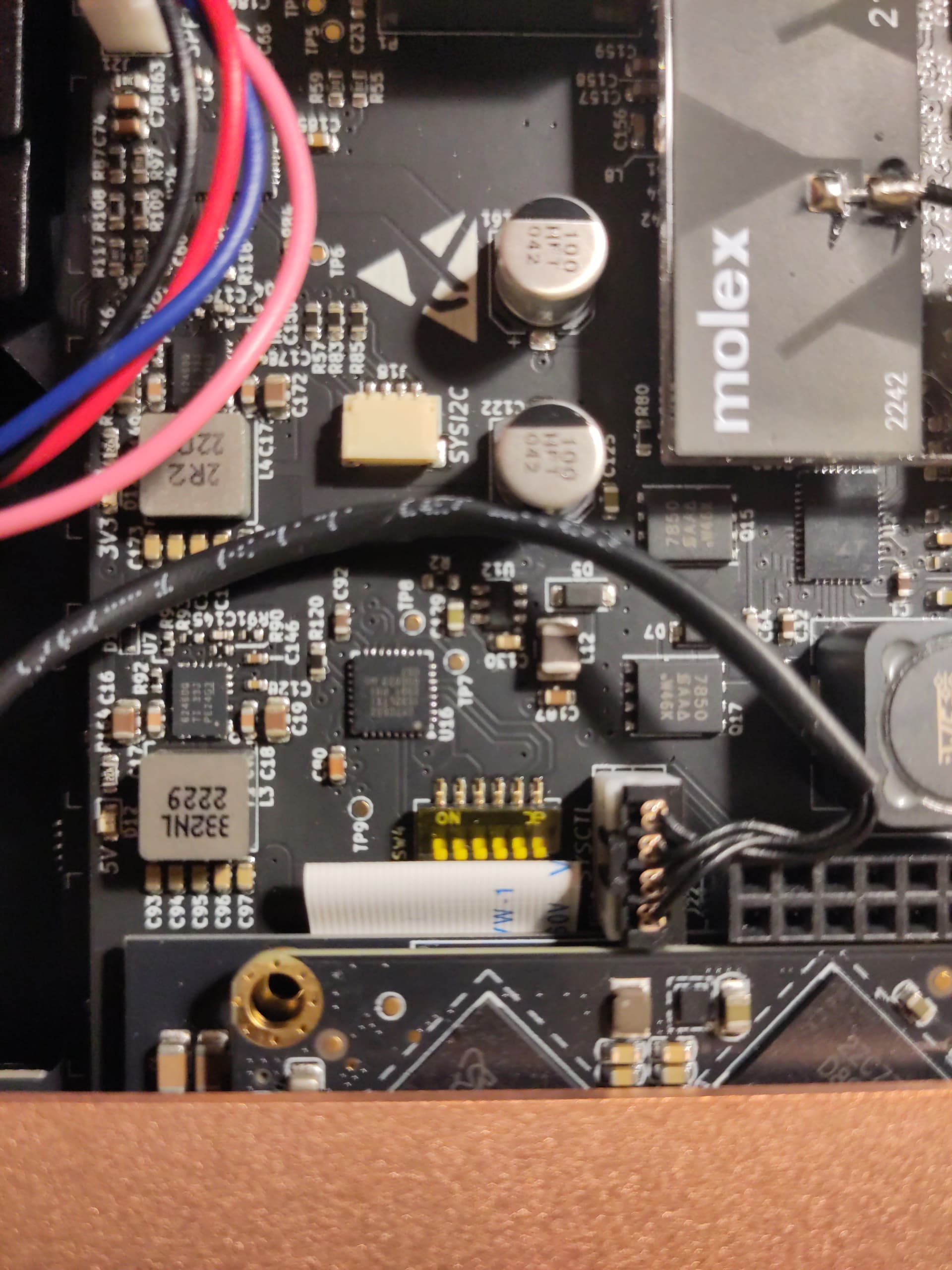
Firstly, for serial via the USB-C power port to be enabled, the DIP switches at SW4 have to be enabled for switch 1 and 2 and the others have to be disabled. It should look like this (SW4 is upside-down in the center):

But it’s unlikely that this is wrong. Since you bought the unit with the RCORE-DSI, and unless you changed SW4 yourself, the switches will be in the same setting for you as they can be seen in the photo.

My second hunch is about u-boot itself. There are two ways to test my theory:

  1. could you flash an sd-card with the latest rk3588-dsi system image and copypaste the output of sudo reform-check here?

  2. instead of flashing the rk3588-dsi system image, try flashing the reform-system-any image and see if your unit boots that

I’m looking forward to your results. :slight_smile:

1 Like

This is what it looks like on my Reform-Classic. DIP switches at SW4:

There is at least one of your problems: all switches are in “off” position for some reason. You have to toggle switches one and two to “on”. That’s the switches on the left of your photos, those directly under the “ON” label.

Your RCORE-DSI Reform is also from a different and more recent batch than mine. You have the copper heatsink without fins.

#000256

After switching the first two switches to on, it no longer starts. When pressing the Circle button, the OLED does not light up.

The two switches should not have any influence on whether the keyboard starts up or not. The keyboard starts up as long as it’s connected to power. Make sure that both its cables are attached to the motherboard and reset the keyboard in the worst case. You are long-pressing the circle key, right?

I removed the batteries for a few hours. Now it starts up again.

Here is the output:

micha@dellmk2:~$ sudo tio /dev/ttyACM0 -b 1500000
[sudo] Passwort für micha: 
[18:15:41.953] tio v2.5
[18:15:41.953] Press ctrl-t q to quit
[18:15:41.954] Connected

[18:15:50.181] Disconnected
[18:15:51.184] Connected
�<*�
    �<W�W�w�3�no��
                  J���~����kJ�
��`�

U-Boot 2024.10-g424c714eb247-dirty (May 06 2025 - 15:46:29 +0000)

Model: MNT Reform 2 with RCORE-DSI RK3588 Module
DRAM:  32 GiB (effective 31.7 GiB)
Core:  335 devices, 26 uclasses, devicetree: separate
MMC:   mmc@fe2c0000: 1, mmc@fe2e0000: 0
Loading Environment from nowhere... OK
In:    serial@feb50000
Out:   serial@feb50000
Err:   serial@feb50000
Model: MNT Reform 2 with RCORE-DSI RK3588 Module
[mnt-reform-series-rk3588] setup_usb()
Hit any key to stop autoboot:  0 
Scanning for bootflows in all bootdevs
Seq  Method       State   Uclass    Part  Name                      Filename
---  -----------  ------  --------  ----  ------------------------  ----------------
Scanning global bootmeth 'efi_mgr':
No EFI system partition
Failed to persist EFI variables
No EFI system partition
Failed to persist EFI variables
No EFI system partition
Failed to persist EFI variables
No EFI system partition
Failed to persist EFI variables
No EFI system partition
Failed to persist EFI variables
  0  efi_mgr      ready   (none)       0  <NULL>                    
** Booting bootflow '<NULL>' with efi_mgr
Loading Boot0000 'mmc 1' failed
Loading Boot0001 'mmc 0' failed
EFI boot manager: Cannot load any image
Boot failed (err=-14)
Scanning bootdev 'mmc@fe2c0000.bootdev':
  1  extlinux     ready   mmc          1  mmc@fe2c0000.bootdev.part /extlinux/extlinux.conf
** Booting bootflow 'mmc@fe2c0000.bootdev.part_1' with extlinux
U-Boot menu
1:	Debian GNU/Linux forky/sid 6.16.9-mnt-reform-arm64
2:	Debian GNU/Linux forky/sid 6.16.9-mnt-reform-arm64 (rescue target)
3:	Debian GNU/Linux forky/sid 6.16.3-mnt-reform-arm64
4:	Debian GNU/Linux forky/sid 6.16.3-mnt-reform-arm64 (rescue target)
Enter choice: 1:	Debian GNU/Linux forky/sid 6.16.9-mnt-reform-arm64
Retrieving file: /vmlinuz-6.16.9-mnt-reform-arm64
Retrieving file: /initrd.img-6.16.9-mnt-reform-arm64
append: ro no_console_suspend cryptomgr.notests clk_ignore_unused cma=256M swiotlb=65535 console=tty1
Retrieving file: /dtb-6.16.9-mnt-reform-arm64
## Flattened Device Tree blob at 12000000
   Booting using the fdt blob at 0x12000000
Working FDT set to 12000000
   Loading Ramdisk to e99fa000, end eceacf7d ... OK
   Loading Device Tree to 00000000e99de000, end 00000000e99f9aa4 ... OK
Working FDT set to e99de000

Starting kernel ...

I hope the solution can be found here…

Removal of the batteries causes the reset I was talking about. You do not have to remove the batteries for more than a few seconds to perform this reset. Instead of disconnecting the battery boards you can also press the reset button on the keyboard. Once you have a system booted again, make sure that you flash the latest keyboard firmware. There were a few issues with hangs a couple of months ago and maybe you are still affected if you didn’t update your firmware yet.

This is odd. Why are there multiple kernels on your sd-card? Are you not using a vanilla system image?

This sounds like your display is still not coming on? But you said that you used reform-setup-encrypted-disk when you booted from sd-card and then you had to have display, no? You also said above that the display only did not come up after you had rebooted, no? Can you please be more verbose about what you did?

I would like to run my Reform Classic with a LUKS-encrypted NVMe. To do this, I ran the reform-setup-encrypted-disk script.

micha@reformmk:~$ sudo reform-setup-encrypted-disk

This will ERASE ALL DATA from your NVMe SSD.

Are you sure you want to proceed? [y/N] y

WARNING: Device /dev/nvme0n1 already contains a 'crypto_LUKS' superblock signature.

WARNING!
========
This will overwrite data on /dev/nvme0n1 irrevocably.

Are you sure? (Type 'yes' in capital letters): YES

Enter passphrase for /dev/nvme0n1:
Verify passphrase:
Enter passphrase for /dev/nvme0n1:
  Physical volume "/dev/mapper/reform_crypt" successfully created.
  Volume group "reformvg" successfully created
  Logical volume "swap" created.
Setting up swapspace version 1, size = 31 GiB (33285992448 bytes)
no label, UUID=43df1ec2-13ca-45e4-bb68-4490213ced0a
  Logical volume "root" created.
mke2fs 1.47.2 (1-Jan-2025)
Creating filesystem with 236059648 4k blocks and 59015168 inodes
Filesystem UUID: 0ebb05d5-b2c1-42cf-815e-2543aada1a1a
Superblock backups stored on blocks:
    32768, 98304, 163840, 229376, 294912, 819200, 884736, 1605632, 2654208, 4096000, 7962624, 11239424, 20480000, 23887872, 71663616, 78675968, 102400000, 214990848

Allocating group tables: done
Writing inode tables: done
Creating journal (262144 blocks): done
Writing superblocks and filesystem accounting information: done

The encrypted NVMe SSD is now set up. Do you want me to run reform-migrate now as well? [y/N] y

  6,861,548,011  99%   13.90MB/s    0:07:50 (xfr#215221, to-chk=0/298336)

Your /boot partition will be on eMMC by default. Do you want it on the SD-Card instead? [y/N] N

I: Using partition on eMMC for /boot: /dev/mmcblk0p1.
This script selects your preferred boot medium. It writes your choice to the file /etc/fstab

This script will copy the contents from the old /boot partition
/dev/mmcblk1p1 (SD-card) to the new /boot partition mmcblk0p1 (eMMC) and delete all files from the latter that were not present in the former.

Are you sure that you want to remove the contents of mmcblk0p1 (eMMC)
and replace it with the contents of /dev/mmcblk1p1 (SD-card)? [y/N] y

commenting original /etc/fstab contents
update-initramfs: Generating /boot/initrd.img-6.16.3-mnt-reform-arm64
Using DTB: rockchip/rk3588-mnt-reform2-dsi.dtb
Installing /usr/lib/linux-image-6.16.3-mnt-reform-arm64/rockchip/rk3588-mnt-reform2-dsi.dtb into /boot/dtbs/6.16.3-mnt-reform-arm64/rockchip/rk3588-mnt-reform2-dsi.dtb
Taking backup of rk3588-mnt-reform2-dsi.dtb.
Installing new rk3588-mnt-reform2-dsi.dtb.
Ignoring old or unknown version 6.16.3-mnt-reform-arm64 (latest is 6.16.9-mnt-reform-arm64)
update-initramfs: Generating /boot/initrd.img-6.16.9-mnt-reform-arm64
Using DTB: rockchip/rk3588-mnt-reform2-dsi.dtb
Installing /usr/lib/linux-image-6.16.9-mnt-reform-arm64/rockchip/rk3588-mnt-reform2-dsi.dtb into /boot/dtbs/6.16.9-mnt-reform-arm64/rockchip/rk3588-mnt-reform2-dsi.dtb
Taking backup of rk3588-mnt-reform2-dsi.dtb.
Installing new rk3588-mnt-reform2-dsi.dtb.
flash-kernel: installing version 6.16.9-mnt-reform-arm64
Generating boot script u-boot image... done.
Taking backup of boot.scr.
Installing new boot.scr.
Your /boot partition is on emmc (/dev/mmcblk0p1).
I: u-boot will prefer the first partition on SD-card over the first partition on eMMC
I: Your current system has its /boot mounted from SD-card.
I: You requested to configure a new /boot on eMMC
I: Instead of just rebooting, power off the system.
I: Then remove the SD-card.
I: Lastly, power the system on again.
I: Power off your MNT Reform by running 'systemctl poweroff'.
  0 logical volume(s) in volume group "reformvg" now active
You can now reboot into your encrypted System.
micha@reformmk:~$ 

After running the script and restarting, the screen remained dark.

To restore the old state, I ran the reform-migrate script. Unfortunately, this did not restore the original state. The screen remained dark even after running this script.

When I start with the SD card inserted with the latest image (reform-system-rk3588-dsi.img), the Reform boots up fine.

However, I notice that despite booting from the SD card, it wants me to log in with the original username and password.

Could it be that it boots from the SD card, but then somehow the eMMC comes into play?

To record the boot process, I followed your instructions:

You can connect the cable, start tio and then start the reform. That way you even are able to receive the very early boot messages and do not miss anything. Your reform should show up as acm0 and acm1 even before you have switched it on.
Okay and you ran that from an existing system that you used for a while or from a vanilla sd-card image? I’m trying to figure out where that kernel 6.16.3 is coming from.

Also in the former case do you have data that should be retained or are you starting over from scratch?

There is no “restoring the original state” after you ran reform-setup-encrypted-disk. Did you get the black screen after running reform-setup-encrypted disk or after (wrongly) trying to fix it with reform-migrate? And how did you run that?

That is great to hear. Did you try to run reform-setup-encrypted-disk from the latest system image? Does that work or do you also get a black screen?

This is odd. So you flash a vanilla sd-card, you put it in and you are still asked for your user credentials of a different system?

There are still several unknowns for me. Unfortunately it’s hard to help without understanding the situation you are in and what steps you performed in detail.

First of all, thank you for your patience.

I will try to answer all your questions.

There is no important data on the laptop. So anything is possible: partitioning, formatting, etc.

When I ran the reform-setup-encrypted.disk script for the first time, I did so from within the existing system. Every subsequent attempt was made after booting the current image from mnt.re/system-image.

I didn’t know that it couldn’t be restored to its original state. If I had known, I wouldn’t have tried it at all.

I got the black screen after running each script, after shutting down the laptop, removing the SD card, and rebooting.

I also get the black screen with the latest script reform-setup-encrypted-disk (tested yesterday).

So you flash a vanilla sd-card, you put it in and you are still asked for your user credentials of a different system?

I proceed as follows.

Boot with SD card with current image.

Set up the operating system (country, language, user, etc.).

Shut down and reboot.

Screen remains black.

Shut down and boot with SD card.

Then the password prompt appears.

The laptop then runs, but after shutting down and rebooting, the screen remains black again.