after working with my Reform Classic on the emmc memory for several months without any problems, I would now like to take care of the (encrypted) environment I originally had in mind: an encrypted NVME.
I’m not what you would call an expert, so to be on the safe side, I’m asking about the correct procedure.
Is it sufficient to run:
sudo apt update
sudo apt upgrade
and then “reform-setup-encrypted-disk”?
As I said, the goal is to encrypt data and the OS.
Good day Micha,
More information would be helpful to ensure you are given the correct advice.
Machine specifics is very helpful. What SOC (processor module) are you using?
Are you planning on a a fresh install or are you trying to save your data and settings?
Also are you using the Reform system image or the Debian Trixie image?
Hello Keith,
The processor module is the RK3588, and you are welcome to perform a new installation with Reform System Image. The data has been backed up.
Yes, Josch, I only performed an upgrade. I did not flash a new u-boot.
The SSD is a WD Green SN350 1TB from MNT (as delivered).
Unfortunately, I don’t have a boot log (I don’t have a UART adapter).
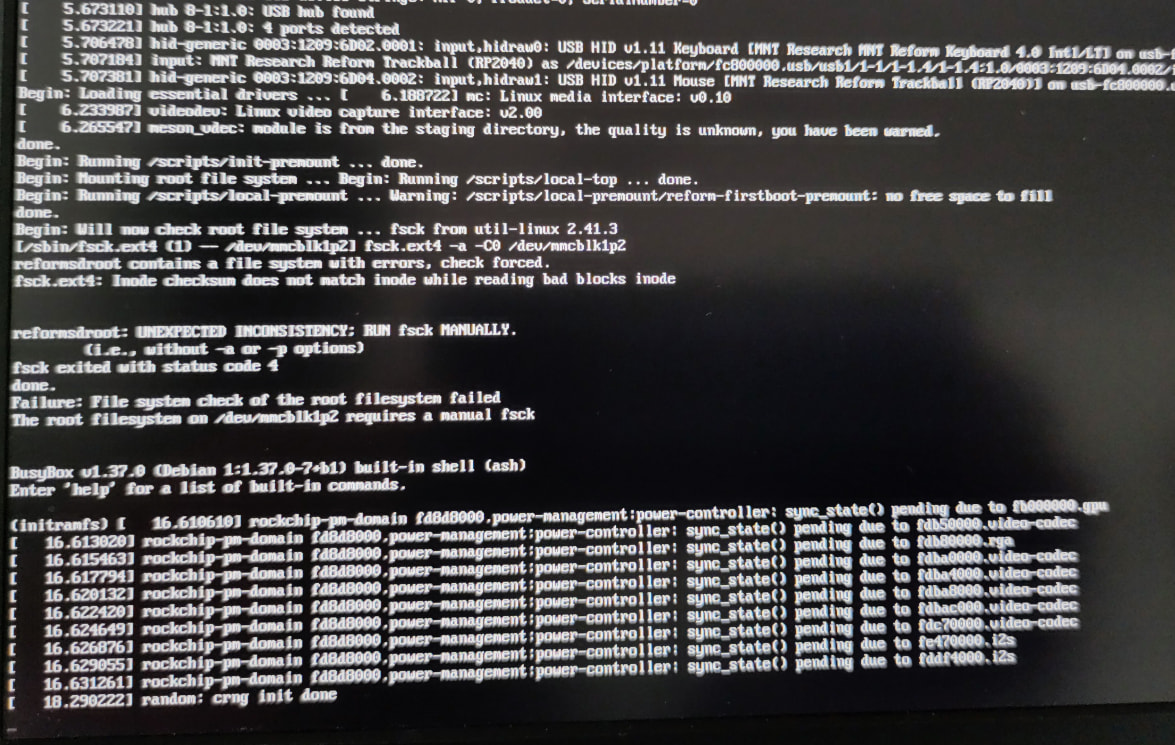
I downloaded the current system image, wrote it to SD, and started the Reform with it. It freezes when booting. Attached is a photo of the messages on the display. I’ll see if I can get the messages another way.
I wish I could. What can be seen on the photo is very odd. It says that you have a filesystem with errors. But that’s strange because you just flashed a new system image. Which system image did you flash exactly and how did you flash it to your sd-card?
I downloaded reform-system-rk3588-dsi.img.gz, unzipped it, and wrote it to an SD card using sudo dd if=reform-system-rk3588-dsi.img of=/dev/mmcblk0 bs=8M status=progress.
Until I attempted the update, Reform ran without any issues.
I’m not sure what that means and how to proceed now. Do I start the reform via SD card with the current image and then use reform-setup-encrypted-disk?
And if so, how do I get the latest version of the Reform Tools?
Depends. Do you want to fix up your existing system or do you want to do a new installation?
Does your system on sd-card see the nvme?
Your system on sd-card will have the latest version of reform-tools. You can upgrade your system on emmc by using reform-rescue-shell but if you do that, you might run into the problem that the tool is very new and might not support your setup yet. If that is the case, please share the output of the tool when it errors out.
This should only appear if your SSD is already filled with LUKS. But didn’t you want to move your system to your SSD?
This is a typical prompt where the case of the possible answers is supposed to indicate which answer is the default if you put in any character that is not a valid answer. The character “Y” is not either “y” or “n” so it will be interpreted as a “n” which means “no”.
Running reform-rescue-shell only gives you a shell inside the system, it does not do any rescuing. It just gives you the option of doing the rescuing. If you find it’s --help output or its man page confusing I’d very much like to hear where I can improve its wording. This is a new tool so it certainly will have some rough edges which I hope we can iron out.
I wasn’t aware of that. Probably a remnant from the last attempt:
Thank you. I’ve learned something new.
I will try to remove the NVME encryption. Nothing needs to be saved. I make regular backups. Therefore, reinstalling would be the easiest way. May I ask what I need to do for this?
You would only need to overwrite luks was if you wanted to use reform-rescue-shell but if you do not want to attempt restoring your existing system, then there is no use for reform-rescue-shell.
After booting from sd-card, run reform-setup-encrypted-disk
It’s working now. I don’t know what the problem was or what I did wrong. After booting with the new image and running through the setup wizard, everything is working as it should again.