Had a similar one on my Pocket. Ended up have to send it to Berlin for repairs. Not only had it sat long enough for the batteries to go flat, one of the 3D printed battery supports had broken, and the pieces rattling around inside the case broke a few thermistors on the charging board.
In your support ticket, you may want to request a new backplate if it has to go in for repairs. A lot easier to do both at once than to charge you tariffs on two shipments.
If bypassing the charger doesn’t work for you, then you could try buying some extra jumpers and going through the process of reflashing the system controller, since you’ll need one jumper to bypass the charger and move the two existing jumpers to power the board. That should at least get you to a workable system without being battery-backed. (See support.mnt.re and follow the “unusable after firmware update” steps for how, but with the charger already bypassed and the board powered from the usual USB-C port).
If you’d like, you could also get some new LiPo batteries (see elsewhere in the forums for details). Obligatory mention that if you do, be mindful of the polarity and swap the connector around if necessary. I bought these but they were the wrong polarity, and used some tweezers to do the swap. There are some guides online on how to do this.
Did some additional looking inside the bottom section mostly out of morbid curiosity, and found the remains of TH2, the thermal sensor on the right side of the charger board. So that explains why the charger doesn’t work.
Welp, while I was waiting for troubleshooting help from support, I tried to reflash the device following the unbricking guide on support.mnt.re. I figured I couldn’t make it worse, but it appears to have done very little.
The power LED comes on when power is applied and is purple now instead of blue, but otherwise I get no response on screen.
I’ve also tried connecting an external monitor, with no success.
It looks like you could get a replacement under warranty. TH2 breaking off because the batteries bumped against it, is also something which happened to others like @grimmware I think it was.
So you are currently running the Pocket with pins 2&3 bridged with a jumper? When you say you followed the unbricking guide, do you mean the guide on how to flash a new firmware for the sysctl? If you cannot boot from a sd-card anymore after performing these steps, maybe you made a mistake along the way. Maybe you forgot to put the PROG switch back to its original position? Following the steps again maybe you are able to find out what you missed?
You also should not need to flash the recovery firmware in your situation. The recovery firmware exists for situations where the keyboard firmware is borked and need to be re-flashed. But since the device is turned on via the keyboard and if you don’t want to/cannot flash the keyboard itself via other means, the recovery firmware for the sysctl will turn on the unit the moment that power is applied without requiring the keyboard to function. But you have a broken battery board and not a broken keyboard so you can also flash the stock firmware instead. The recovery firmware which the unbricking guide recommends is firmware version 20250724. The most recent firmware version for the sysctl is 20251118 and you find the artifacts here:
I have my charger board bypassed by bridging pins 2 & 3.
My keyboard still functions, but I’ve never been able to boot the device via emmc or SD card, the OLED shows the MNT reform logo and an LED comes on on the back of the machine but there is no other response. Previously this light was blue, and it is now purple.
I’ll try reflashing the normal firmware. I think next steps would also be to break out a serial cable and see if I can get any output from there to help diagnose my system.
Yes. Unfortunately there is no graphics support in u-boot (yet) so the best way to find out what’s going on during early boot is to diagnose the problem via a serial connection with a usb uart adapter.
I fear we will need to see the output on serial to learn more about what is going on.
One theory I have is that since you bought an imx8m+ pocket reform from crowdsupply, maybe it’s one of the really old units with a u-boot version which does not set ${bootargs}?
So one thing to try out would be to move or remove the directory extlinux on the first partition (/dev/sda1 in your case) and make sure that the file boot.scr exists on that partition.
But we are in the dark without serial output and i can imagine it is frustrating not to be able to see what is going on.
$ ls -lah /media/jacob/reformsdboot/
total 75M
drwxr-xr-x  4 root root 4.0K Jan 20 12:25 .
drwxr-x---+ 3 root root   60 Jan 20 12:27 ..
-rw-r--r--  1 root root 5.5K Jan 19 09:00 boot.scr
-rw-r--r--  1 root root 342K Jan 17 09:41 config-6.18.5-mnt-reform-arm64
lrwxrwxrwx  1 root root   67 Jan 19 09:00 dtb -> dtbs/6.18.5-mnt-reform-arm64/freescale/imx8mp-mnt-pocket-reform.dtb
lrwxrwxrwx  1 root root   67 Jan 19 09:00 dtb-6.18.5-mnt-reform-arm64 -> dtbs/6.18.5-mnt-reform-arm64/freescale/imx8mp-mnt-pocket-reform.dtb
drwxr-xr-x  3 root root 4.0K Jan 19 09:00 dtbs
-rw-r--r--  1 root root 2.0M Jan 19 09:00 flash.bin
-rw-r--r--  1 root root  38M Jan 19 09:00 initrd.img-6.18.5-mnt-reform-arm64
drwx------  2 root root  16K Jan 19 09:00 lost+found
-rw-r--r--  1 root root 101K Jan 19 09:00 ls1028a-mhdpfw.bin
-rw-r--r--  1 root root   97 Jan 17 09:41 System.map-6.18.5-mnt-reform-arm64
-rw-r--r--  1 root root  37M Jan 17 09:41 vmlinuz-6.18.5-mnt-reform-arm64
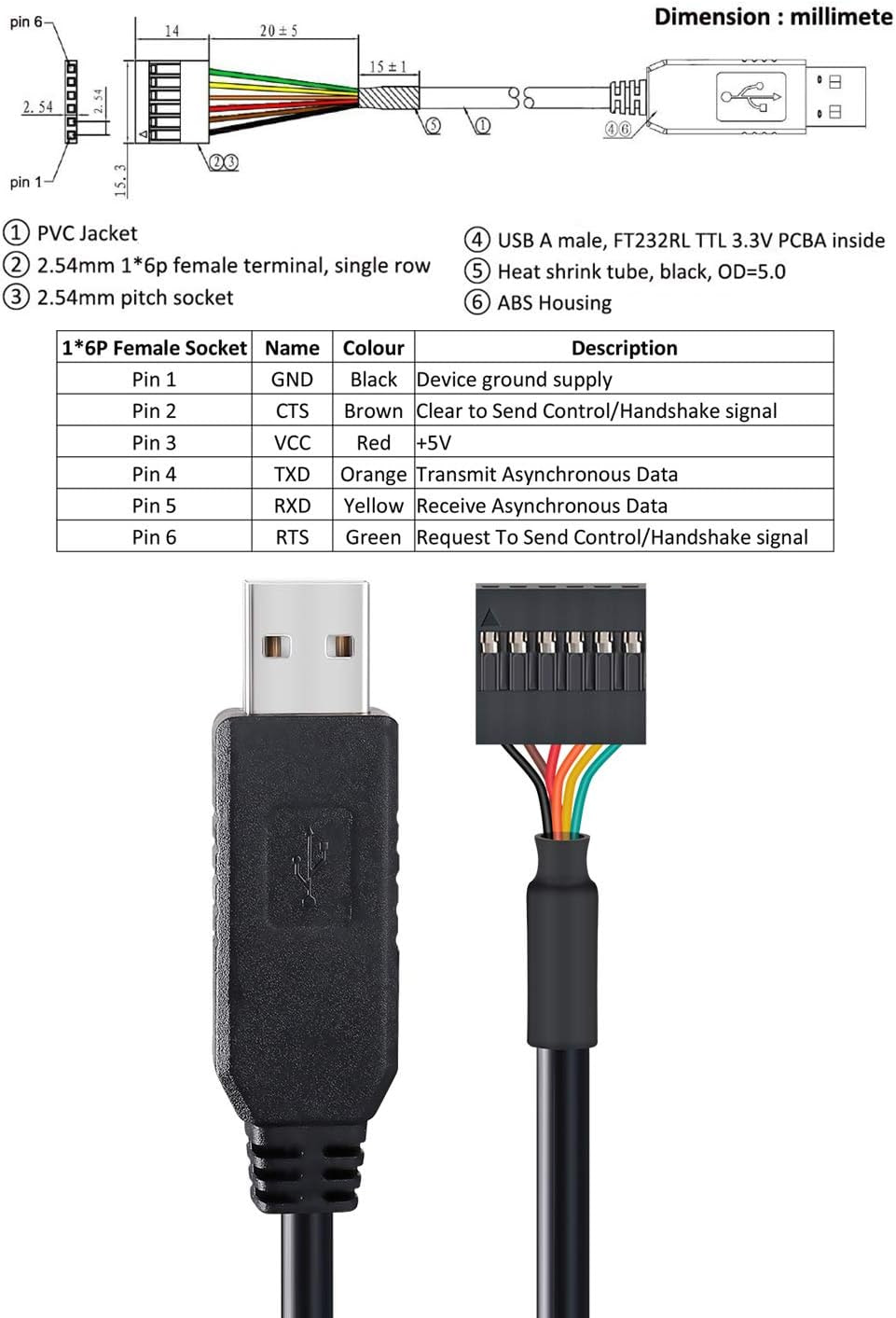
I’ve got a serial adapter but it’s in the 6-pin FTDI format, so I’ll need to dig up some extra cables somewhere to adapt to the three pins of the pocket.
Well today my breadboard wires arrived, wired up my pocket to my serial adapter, triple-checked my wires, and got no output on the S2 ports at 115200 baud.
SD card in or out did not seem to make a difference.
I’m completely lost, I really thought that would have worked…
Does this suggest my compute module is dead or some other catastrophic failure?
It is very easy to connect to the wrong pins on your board.
Yes, with an imx8m+ you have to connect to S2 at 115200 but there are still a lot of ways to make a mistake.
For example, it is a bit tricky which of the six pins on the pocket motherboard is S2 (it’s the 3 pins which are harder to reach) and it’s important to connect RX to TX and TX to RX. It is also possible to run the serial terminal emulator with incorrect options.
One trick for example for tio is to manually unplug the usb device after starting tio and if you selected the correct device then tio will print:
[01:09:44.227] Disconnected
[01:09:45.228] Warning: Could not open /dev/ttyUSB0 (No such file or directory)
[01:09:45.228] Waiting for tty device..
You can then re-connect the usb cable and tio will say:
[01:09:49.232] Connected to /dev/ttyUSB0
Your computer might have multiple tty devices and this way you’ll know you connected to the right one with tio.
You can also send us photos of your wiring if you like us to have a look. Even in case you wrongly flashed your sd-card you should at least see the output of u-boot when you power on your device.